I have JMRI, MMC and Traintastic (v0.4.0) running on my Pi, thanks everyone for your help.
I now want to connect Traintastic client on my Windows 11 PC to the server on Pi but don’t seem to be able to connect.
The client on Pi is working fine, though I have had to change the port on the server to 5600 to avoid conflicts with MMC. I can connect to MMC from my Windows 11 PC.
I’ve run Test-NetConnection -ComputerName 10.101.1.113 -Port 5600 from Windows PowerShell to test if the port is open, and I get connection failed. ON the Pi, if I run sudo netstat -tulpn, it lists the ports that are open and shows that 5600 is bound (?) to 127.0.0.1 and the process is traintastic-server, however I note that other ports that are bound to ::: are accessible from my PC. (I’ve tried disabling my PC firewall and AV, btu to no avail). Could this be the problem and how do I resolve it (I’ve googled changing from 127.0.0.1 and found nothing).
127.0.0.1 is localhost, it’s never reachable from your network, it’s only the loopback device on one machine. It doesn’t matter which operating system is used, that’s always the case.
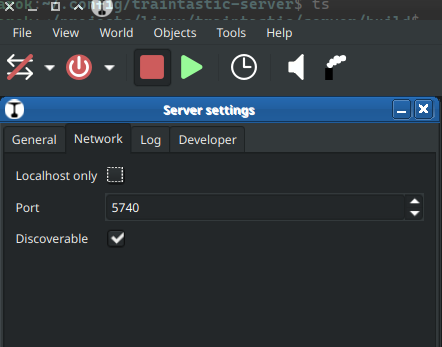
You must remove the checkmark at “Localhost only” under Tools / Settings / Server settings and then restart the server.
The server starts than with IP address 0:0:0:0, which means for every network device of your computer (or Pi). Normally the clients (also multiple clients) found the server, if you have a router and the clients runs on a other network, you must enter the IP address.
Try it
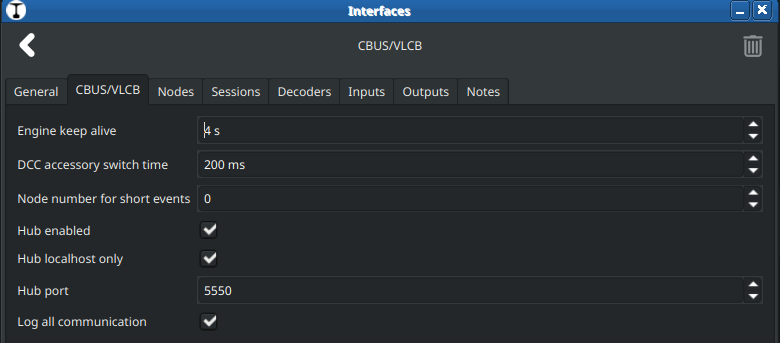
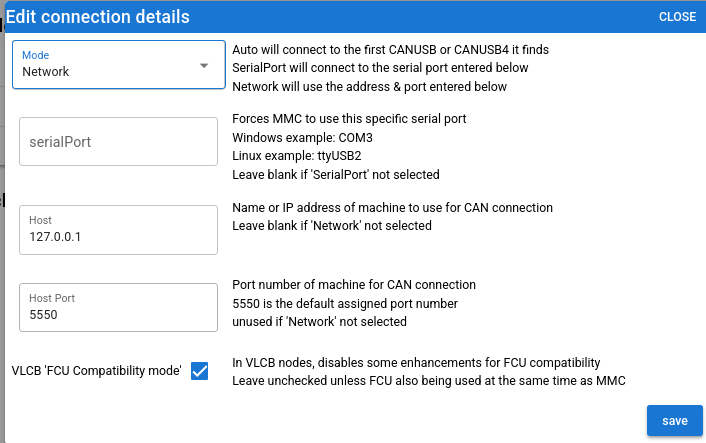
You could also use the hub in Traintastic for MMC.
Here it’s the same, Hub enabeld and remove the checkmark “Hub localhost only”. Then MMC could use the Traintastic server as a hub and you have no problems with same port configurations.