Control of Turntable?

Not an easy task. But control of turntables is really needed, imho.

1 Like

Yes I agree, same applies to a transfer table/traverser :slight_smile:

I’ve added a backlog entry on the roadmap, so we can note all these.

Do you have a turntable? If so, which model and controller?

1 Like

A lot of (märkin probably other also) turntables work by pressing a button that starts turning it left or a button that starts turing it right and it stops automaticly because of the hardware and they often have output contacts that give feedback on the position

I think a good implementation for this would be an ui that allows to create a turntable with a custom ammount of steps. eachs step can be asigned to a feedback signal input or set as not conected/unused actualy things like the Märkin 72941 (dont know how its called) work exactly the same.

But because of a lot fo speciality between manufacturers a small database of turntables would be needed. In some turntables without feedback a setting for turntime would be probably enought to avoid colisiosns. There also are full digital controllers for turntables(example märklin 7687 ) but i dont know how the comunication works. my assumption according to the button overlay sticker that is included. That normal turnout addresses are interprated as functions like go left or go to track 12. this would need anoter full data base or some option for users to insert the informations into the custom UI if avivable.

It might be too early to talk about specific solutions and models. But anyway.
I think the turntable in Traintastic is an abstraction layer. How specific models are interfaced is a middle-tier, preferably Lua-scripting, I guess.

So what is needed.

  1. An entity in the layout designer, actually two, one for turntable and one for traverser.
    The properies of this object might be something like an array of tracks, each with its own set of properties. And also a definition of outputs. Bitwise using several “turnouts” or an output IMM, with aspects, or something else? And a definition of inputs. State? (moving,stationary) track? Current location etc.

  2. The actually connection with hardware, the signaling, is done with lua-scripts, if possible.
    Perhaps new methods/functions needs to be there in Lua for this to work. Callbacks?

  3. The specific hardware. Naturally.

Just my €0.02

My current idea is to use the “driver model”, this is also used for (Smart) Boosters in Traintastic, we can then have a generic/abstract turntable control interface with a driver that translates it to the correct commands. This will make it easy to support many different types. The driver can also specify what is supported, e.g. step_ccw, step_cw, rotate_180, select_track etc.

@Goofy I like the Lua idea, that can be handled by a “Lua driver”, with specific functions and callbacks, that will enable users to built their own driver if needed. :slight_smile:

For all well known commercial models it would be nice to have a proper driver.

Its nice to discuss this a bit and gather some details about different types of control, that makes implementing it in the future easier :slight_smile:


A bit background on the booster driver:

  • A generic booster object
  • Each booster has a type property that determines the driver to use.

A booster driver:

  • Has its own set of properties for that specific driver:
  • Reports to the generic booster which values are available, so called feature flags.
  • Is responsible for the communication with the booster, usually via an interface.

Currently there are two booster drivers, a thrid one (YaMoRC YD7403) is developed, but I need to test is, but that requires new firmware from the vendor. (The new firmware will support event driver operation via LocoNet.)

i looked a llittle bit in how other software depicts turntables and its nearly impossible to depict an variable turnout(diffrent amount of tracks) on a tile based layout without creating giant tiles.

I think the best prectice would be something like creating an 3x3 tile for control/visualization and a for the tracks a type of Portal Connection could be used. Something in the direction of an end of track object that theoreticly teleports onto the turntable.

I think both options are possible, a basic NxN tile + some connector tiles will work.

A resizable turntable tile could work too. 1x1 gives 8 connections (4 edges, 4 corners), 2x2 gives 12 connections, 3x3 gives 16 connection etc.
An example drawing:
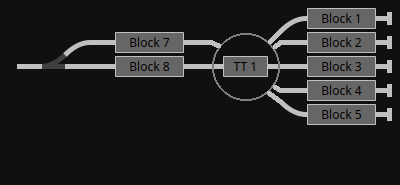
Even if a turntable has 48 positions, most people only use a few, so you only need to specify for each connection what the track number is.

If someone uses all 48 tracks, you’ll need a 11x11 tile, but I don’t think that is a big issue, you also need a lot of board space for all the tracks anyway.


It’s nice to talk about this and gather some ideas :slight_smile:

1 Like

I think the variable sized square is workable, and preferable. And I also guess that 16 connections is more than enough for just about all modellers.

Can I start to make a code-spike? There is already a Turntable support · Issue #92 · traintastic/traintastic · GitHub for this feature. Or do we need more refinement and/or narrow scope? This is a both a client and server feature. Thoughts?

Hi @Goofy,

Yes, feel free to build some code for it, we can shape and refine it along the way, so it will fit in nicely in Traintastic’s codebase :slight_smile:

Are you a bit familiar with the Traintastic codebase already?

Scope:

  • Resizable NxN tile
  • Driver based control model like booster, for support of various control systems
  • Configuration UI (generally this is auto generated, but I expect some custom stuff will be handy here)
  • Control UI, currently tiles have a popup menu for this
  • Lua support for controlling it

My advise would be to focus on turnout control and skip the block for now, for upcoming automatic train control I’ll rewrite parts of the block logic.

Another thing to keep in mind is a traverser (either single or multi track), it is closely related to a turntable.

I’d don’t have a turntable or traverser myself, do you have any? (If so which system/decoder is used to control it?)

Greetings,
Reinder

1 Like

I’m using Claude Code to help me with the overall view of the code. :slight_smile:
So yeah- sort of familiar… This is actually the first codebase I ever tried working on
with Qt. (blush). BTW - The client builds and runs nicely in VS2022, with Qt 6.11.1

Is it ok to push a feature branch? (That is - not doing a MR) Just to talk about things, making comments?

I do not have a commercial turntable, the one I have is a DIY. (Made from the base of a surveillance camera :slight_smile: ). It uses a stepper motor, esp32 etc. It uses its own config program and reads a Json-config. A single Loconet address for positioning, DCCext. Feedback not yet done, but will use occupancy-bits. 10bits in sequence, with configurable base address.
So - no - it’s not your usual turntable. But I might be able to get my hand on something like
a Roco-70"

Hi,

Yeah sure, just fork the Traintastic repo on GitHub and create a feature branch and push the changes, then we can discuss it here :slight_smile:

Nice project :slight_smile:

We need to find out how to wrap this in a driver, what I personally want to prevent is having Traintastic 10+ drivers for all kinds of DIY projects (no offense), it will become a maintenance hell.

I really like your idea of a Lua backed driver, that will solve the DIY support challenge. Users the will have the option to either write a DIY driver in Lua or make their DIY project compatible with a well known control solution.

What LocoNet command(s) are you sending to the ESP for controlling the turntable? A DCCext message via OPC_IMMPACKED?

With the current version of Traintastic it is already possible to send custom LocoNet/DCC commands, see LocoNet interface send() and imm_packet() functions.

By placing a few push button on the board and some Lua logic you might already be able to control it :slight_smile:

Does you DIY turntable need homing?

Greetings,
Reinder

There’s also a Sector Plate, which is very similar, but normally pivots from one end.

I have a sector plate on a CBUS layout, but just use feedback to know the position; it is manually moved, but would be good to see this type of device supported in the long term.

1 Like

Does you DIY turntable need homing?

Yes. It is an opto-gate and a 180deg “blocker”. The opto-gate is used for:

  • Finding “home”
  • Trackpower-polarity
  • Shortest way to home at startup

Finding home involves doing 3 or 4 passes over one “edge” of the opto-blocker. It always determines “zero” going CW, and in its final pass it is moving one step at a time.

What LocoNet command(s) are you sending to the ESP for controlling the turntable? A DCCext message via OPC_IMMPACKED?

Yes. Exactly. One address, many “aspects”.
Feedback however will probably use several “Loconet-Inputs” One input for “latch”, one for “in motion”, and probably 7 for “track location”, binary encoded. 0-63.

I’m using the old A3967 EasyDriver Stepper Motor Driver, movement is smooth. I have it fixed at 1/4-steps.

We need to find out how to wrap this in a driver, what I personally want to prevent is having Traintastic 10+ drivers for all kinds of DIY projects (no offense), it will become a maintenance hell.

Totally agree.

The hard thing to do is to find the hardware, turntables and decoders. YD7652 seems like a usable decoder. In fact, the “Steuern über DCCext Aspekte und Funktionen” is pretty close to my setup. https://www.yamorc.de/downloads/YD7652.Konfig.de.pdf

Good point, yes that is another variant.

Just curious, how did you configure the CBUS events? One for each position that is ON when it is exactly in position and all are OFF while moving?

Does it auto home on power on, or do you need to send an special aspect value to home it?
Does is also have a special aspect command for doing a 180deg rotation?

Wouldn’t it be easier to just use one input address per track + a moving. That is something we can more easily support in general. If we extend the YaMoRC DCCext protocol with a home aspect (e.g. 255) then you might be able to use it without custom Lua driver (all though that is still nice to add and test as well.)

Did a quick read of then YD7652 manual. The Märklin and Fleischmann protocols are explained to, so it shouldn’t be that hard to build drivers for those too.

That would make the turntable driver list (for now):

  • Märklin
  • Fleischmann
  • YaMoRC DCCext
  • EX-Turntable
  • Custom/DIY/Lua (we need to name this properly)

There are more in the wild, we can always add them once someone requests it, then we have a test user as well :slight_smile:

@swinguk is there also a turntable control kit for CBUS? (If yes, is there any documentation available about the commands used to control it?)

A (not to expensive) turntable is on my need to buy list, but currently the financial priority is at the Demonstration and test layout project (which is quite expensive), part of the hardware is sponsored by companies, I’m very grateful for that.

Greetings,
Reinder

Does it auto home on power on

Yes. It must. Just like any product using one or more stepper motors (DotMatrixPrinters, 3D-printers, etc) Without knowing its position, no meaningful action can be taken.

Wouldn’t it be easier to just use one input address per track + a moving.

Absolutely, from a development point of view. From the view of an end user; What if I currently use Input addresses 42-50 for my turntable, and have occupancy decoders from address 51 and upwards. Then I want to add another track to the turntable… Just a thought.

If we extend the YaMoRC DCCext protocol with a home aspect (e.g. 255)

The fact that a stepper and a “home sensing thing” are used is an internal concern, imho.
For an usage API (loconet) the turntable has tracks, and we select tracks only.
Only four movement commands are needed in the abstract layer;

  • CW
  • CCW
  • Goto Track X
  • Rotate 180

How the turntable actually does this internally is sort of uninteresting from the view of TrainTastic. One might argue that “Reset” or “Init” is a fifth way to command the Turntable.

Home is not a track, it is just a way for the turntable to reset its step-counter to zero when the bridge is at a known position. The tracks are just values in a trackNumber-stepCount dictonary.
BTW, My hardware uses a 400step/rev stepper, and a stepper controller fixed at 1/4 steps. The gear ratio is 1:6. Giving a total of 400x4x6 steps. (or “tracks” if you like :smiley: ) But this is just fun facts, and totally irrelevant for TrainTastic.

Yeah, I get that :slight_smile: what is meant was if it is required to send a home command before it does the homing sequence. (My 3D printer needs a command after power on before it homes.)

Then you’ve a challenge :stuck_out_tongue: the LocoNet address space is quite large so I would use 1000 or so as base address for the turntable feedback, then the chance of a collision with feedback is much smaller.

I agree it should be, but for some DIY’s it might not be, but for now we can leave it out :slight_smile: we’ll see when someone asks about it :slight_smile:

What about naming them:

  • move(steps) - where steps the number of tracks, positive is CW, negative is CCW.
  • moveTo(position) - where position is track number
  • rotate180()
  • stop() - stop/abort current movement (at least Marklin seems to support that)

Apart from rotate180() we can use these also for the traverser/sectorplate/trainlift etc.

moveTo and rotate180 could have an optional direction argument in case of a turntable as it is possible to reach the new position CW and CCW.

Greetings,
Reinder

p.s. can you post a picture of your turntable, love to see it :slight_smile:

Yes, in my case, I have 3 ON/OFF events produced, with the ON produced when the sector plate is aligned (so yes, all 3 would be OFF when it is moving). The information is used to light LEDs on the display panel, and also used as inputs into the logic module to determine where it is for signalling.

One of the advantages of CBUS being more of a protocol than a defined set of modules is that anyone can create their own modules. The disadvantage is equally the same - anyone can create modules, which will naturally work differently.

However, in the case of a turntable module; there used to be one that I’ve not seen used in some while; I’m aware of a new module being worked on (ie in beta) but no documentation available per se. In essence, whilst it can be configured in multiple ways (and can actually drive a turntable, a traverser or a sector plate), I use it with 4 exits defined as unique CBUS events, with each one configured on the turntable module to be where to place the “head” end of the turntable when an “ON” event is issued. It is possible to configure the module to accept “OFF” events being the same position, but reversed, but due to a combination of other modules that are sending the events, that’s not possible in my case, hence just using ON events for each position (in reality, I only have 2 positions, but need 4 events to reflect those 2 positions being at 180 degrees out)

So, in terms of CBUS support, if it has similar support to turnouts (ie the ability to use short / long events which are either ON or OFF to define each exit, and similar control around feedback (where multiple events can be involved), it should be possible for people to test and ask for any further changes.

Absolutely. Mush better.

I guess so. In my implementation it just calculates the shortest. In the case of 180, I think CW wins, don’t remember.

Sorry. I’m quite a distance from home, summer vacation. I’ll send some pictures once back.
It’s basically made from laser cut plywood. And some 3D printed items. Hardest thing is to get the tracks to be perfectly aligned with the centerline (diameter) You need to make sure the track ends up so that 180deg rotation aligns exactly.

Here is one part 45deg.

1 Like

A small progress report.

Yes. Probably. Right Now I’m working with a 3x3 turntable. I do not think that even numbers make sense. So 1x1, 3x3 and possibly 5x5 are the only sensible sizes. Or are there other cases? Other thought about turntable size?

After a few minor setbacks I’m still confident that the turntable is doable. (The fact that North is 180deg, not 0, confused me and my code for a while)

Here is what the Turntable looks like as for now:

The small “stubbs” in the turntable-tile are drawn when a connection is found. The turntable
only stops at positions where there is a connection “a track” (one end or both ends).

Question: With 16 positions, can we assume that position 0 and 8 are 180 deg apart? (1 and 9, 2 and 10 .. etc) This is physical positions. Logical “tracks” is another thing, you might have 4 tracks and 16 positions, this question is about positions only.

Item menu: (Yes need more translations :slight_smile: , and a MoveByX-item)

There is also configuration UI, work in progress:

OK, end of progress report. Any thoughts and/or suggestions so far?