I think 3x3 will be a practical minimum once the turntable itself is a block, due to the amount of space needed for drawing.
I currently don’t see a reason to put further limits to it, so for size NxN N can be in range 1 to e.g. 8 or so.
Yes that is a bit odd indeed, reflecting that now, it would be better to set North to zero, but changing that will be a challange.
Really nice work, it is looking great, I really like the on demand connection drawing! Great job.
Yes, we should do that, for commercial turntables this is very common (most likely even standard practice). For DIY turntables it might not, but in any case that can be solved by raising the number of logical positions. For a future traverser it can work in the same manner, if track on both sides are exactly alligned they must have the same position number.
How I think it should work is: the user can set a total number of logical positions (for turntables it must be even) and map that to the each connection, it should not depend on the size of the tile.
I’d like to hear you opinion too
Is the code already on a public branch?
Many thanks for the update really nice to follow the progress and that we can discuss it a bit more.
I do not think that is necessary. The user simply drags a new turntable onto the board
and starts attaching (drawing) track to it. The number of tracks attached (connections) is detected by the turntable and if tracks are opposite then they are 180deg apart, as discussed above.
The total number of possible connection is hence determined by the size of the tile.
3x3 → 16. 5x5 ->24, 7x7 → 32 (4x(N+1)).
I’m not sure a commercial turntable has the concept of connections or the concept of tracks.
One simply snaps a track (like Roco 42616)to the turntable and that’s it. Now the platform
swings to that position too.
With digital-control the turntable gets “tracks”. Adding something like an YD7652 adds a
whole bunch of settings and configurations.
Somehow the connections to the turntable-tile needs to be assigned to “track-numbers”.
(The YD7652 has settings for this)
And perhaps also a track angle? If a track angle is assigned, then the mirroring connection
track angle also needs to be updated, the 180deg needs to be maintained.
I think that somewhere the relation between “connection” and “track no” needs to be configured. And the need for this depends on the actual implementation, and hence
this is something that goes into to driver configuration? Or what do you think?
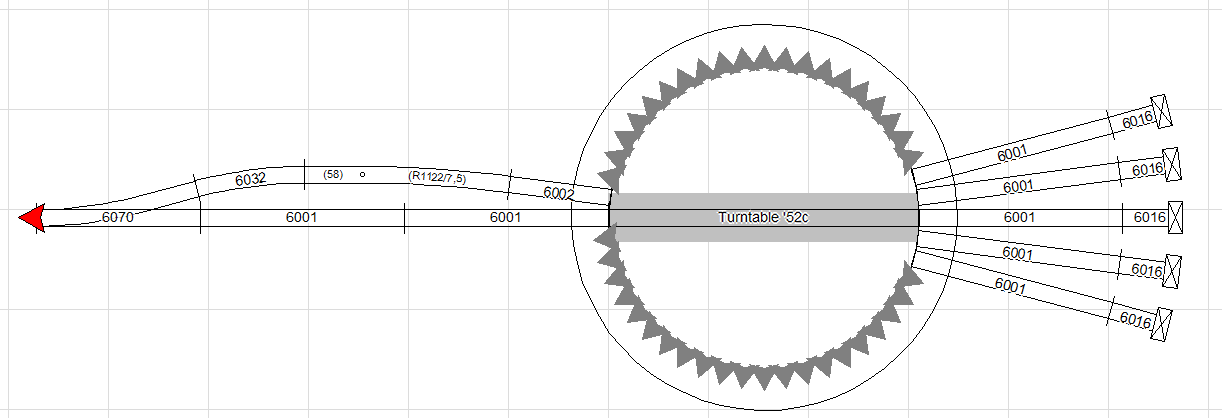
Look at this layout. The turntable has 15 tracks. But only 8 has a 180deg “partner”.
So there are 4 pairs and 7 “single” tracks.
If you would make a board for this in Traintastic it would need a turntable with 14 + 8 connections. 22. A 3x3-tile is simply not sufficient even if it can have 15 connections.
A 5x5 tile is needed in this scenario. I do not think this is a problem, it
is actually kind of a feature. The Traintastic board can in a clear way display what is reality.
And finally a though about tile-sizes.
Today it is hard, perhaps impossible to resize a block that has two connecting tracks.
To resize a turntable is a near impossible task, if you need another tile size on the board;
Just delete your current turntable and create a new one?
Currently the code does not allow a 5x5 turntable-tile, I need to fix that.
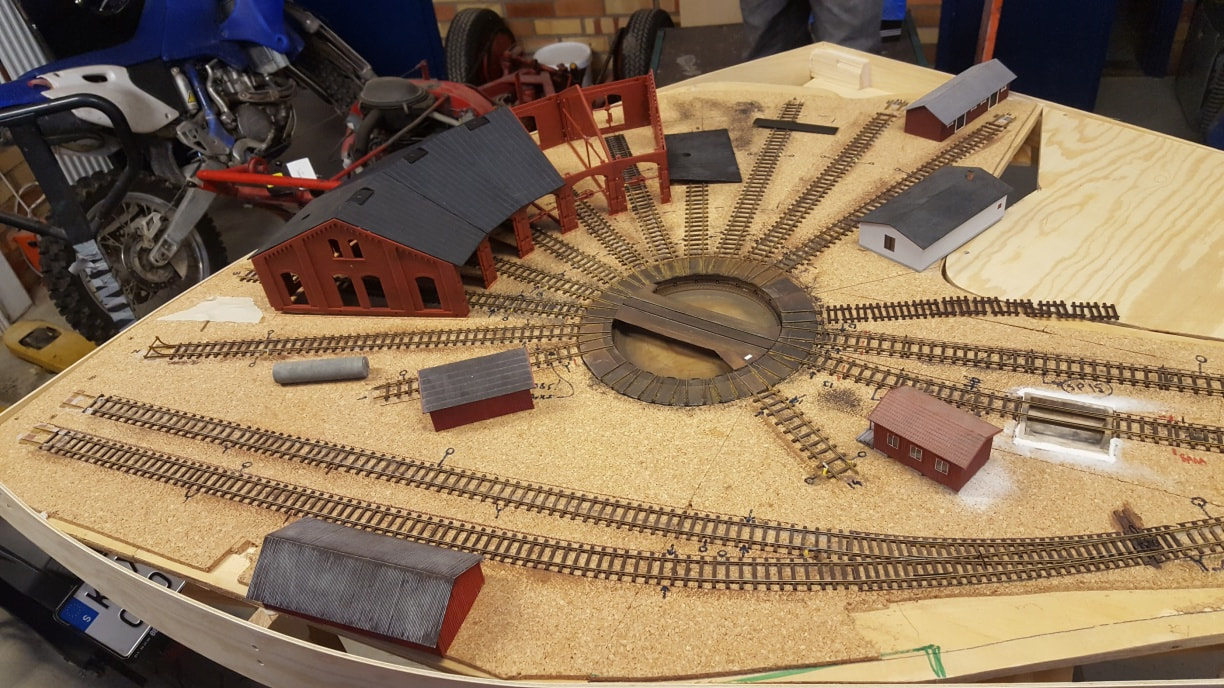
This Fleischmann 6052 turntable has 48 possible track connections, but only 7 are used. To visualize this in a schemetic a 3x3 tile is sufficient. Users who want to have a more realistic representation can use a 11x11 tile (which has 48 board connections too).
It depends on the used controller, so for Traintastic it is best to stick to positions. So in the image above the position range is 0 to 47, and there are tracks at 0, 1, 22, 23, 24, 25, 26.
Resolving the position to the correct command is a driver task.
A few years ago I’ve helped someone with a Marklin turntable+controller, then you had to learn the controller all positions with a track connection. The keyboard could the be used to move the turntable using keys 1 to 7 (for the setup above).
Very nice layout, yeah it would need a bigger tile due to the 180 deg, rule.
I think we are on the same page. I’m currently trying to make the tile sizeable beyond 3x3, as
well as doing drivers.
Question: About Lua-scripts.
I have been identifying these scripts:
1: Callback script - new location - currently now at track#. (moving or not)
2.Callback script - bridge moving changed (moving, or not)
3.Process script for request new position. (This script will probably send a Loconet message)
Are 1 and 2 the same callback?
Are there any more Scripts? Like a Reinit(Reset)-call to the Turntable?
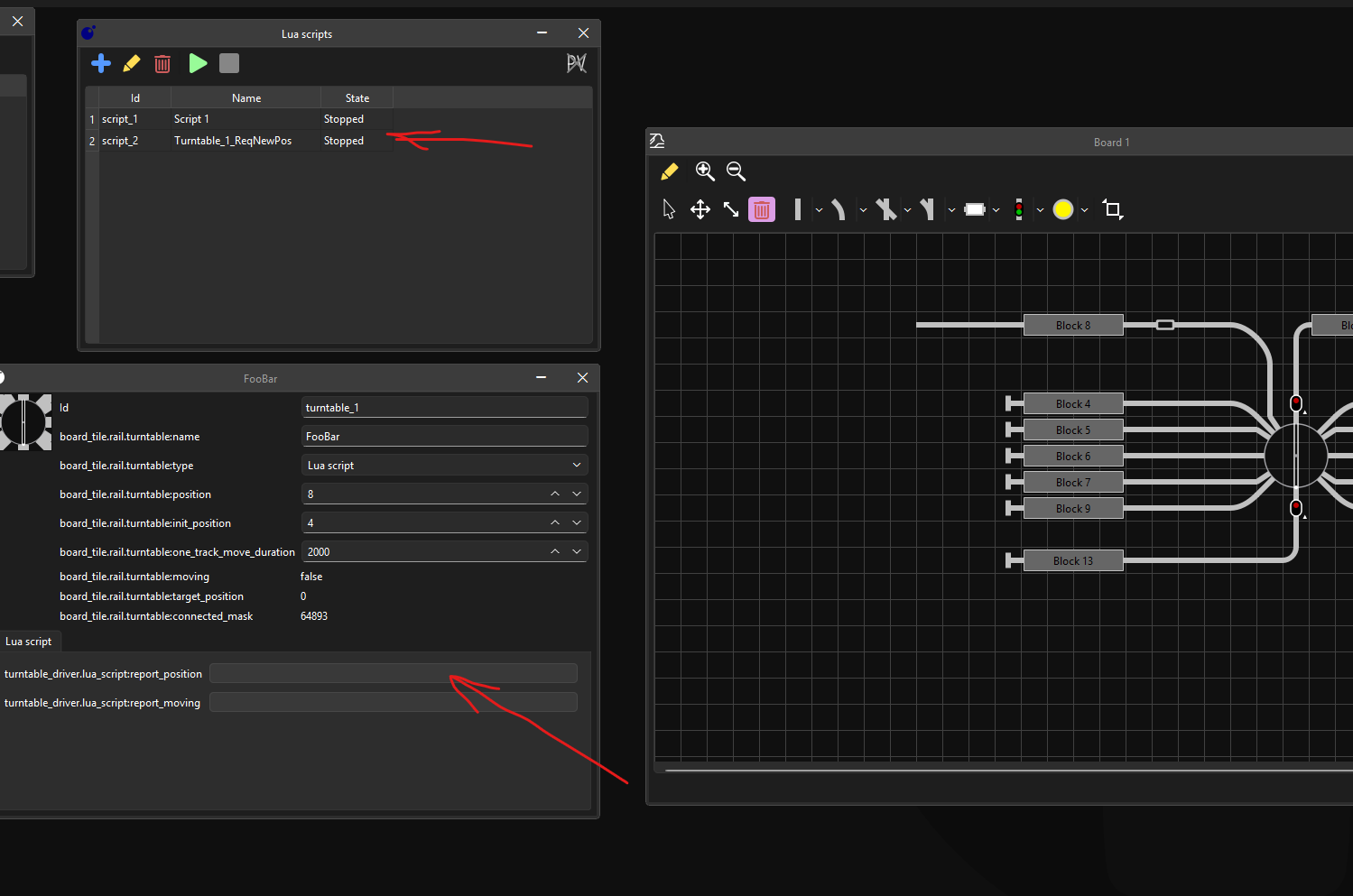
Where are the Lua-scripts going? Where are they to be located in the client?
Two alternatives below in screen-shot:
I’ve a few long standing ideas for Lua, the currently available scripts are for general use. My idea is to add different types of scripts so they can be more specific for a task, e.g.
hardware drivers like for a turntable/traverser etc.
complex signal aspect logic, this will allow users to get it exactly right
custom train control logic
libraries (make code reuse/sharing easier)
for e.g. a turntable driver the script then can have a special turntable global, e.g.
-- driver can inform what is supported:
turntable.supports.rotate_180_cw = true
turntable.supports.rotate_180_ccw = false

-- driver can register callbacks:
turntable.rotate_180 = function (ccw)
  -- called by turntable tile, send stuff to hardware
end

turntable.move_to = function (position, ccw)
  -- called by turntable tile, send stuff to hardware
end

-- driver can update things like
turntable.moving = true
turntable.position = 23
Using the callback registration it is possible to detect what is supported and what not, some might be optional in the future.
A single script with all driver logic is best, it should just contain code like a C++ turntable driver does.
Adding a Lua driver sandbox will require some work I think, it should be much more restricted than normal script as its only task to translate the commands back and forth.
For quick testing now I think it is easier to write a C++ driver, once that work we can port it to Lua.
Excellent! Good thinking, I was kind of lost on “how” and “where”.
Having different “spaces” for related scripts is a good structure, I think.
I will postpone any “Lua-Script Turntables” for now. I’ll just work on the most basic
type for now. One without any type of feedback, using plain turnout-addresses in sequence.
Just to see if things hold together, I’ll keep posting here.
Would it be interesting to add a MGP turntable-driver to the list of drivers?
It is straight forward and not very expensive.
I have no relation to, or interest in, this company.
1.7 EXTERNAL DRIVE CARD CONNECTION
The decoder has built-in drive for so-called Unipolar stepper motor, 5 volts and max 500mA.
More powerful engines or engines of the type bipolar can be used but then with an external drive.
The external driver is then controlled by 2 threads (3 if “reset” is used).
The “step” of the driver is connected to output 7 of the decoder.
The “direction” of the driver is connected to output 6 of the decoder.
If the “reset” on the driver card is to be used, it is connected to output 5.
It might be that the “home” and “init” functionality of the driver does not like my 180deg
slot-blinder. My “home-pin” doubles as a hardware polarity switch thing.