How to use Trainstatic simulator on Windows

Hello everyone!

Thank you for the terific work with Trainstatic.

I created my own word according to my layout and my hardware. It looks fine and I can drive trains manually.

As I am not allways near my layout, it would be very interesting to use the simulator to go on debugging scripts even when I am traveling out of home. But I did’nt find the install for the simulator, neither found the manual and how to connect it to Trainstatic. I saw that I have to use a json file to describe the layout for the simulator. How to create it ?

Can you help me by some instructions to start playing with the simulator ?

Kind regards

Conchito

Hi Conchito,

Welcome to the forum! :tada:

The simulator is not yet part of the official release it is still on a development branch, you can find the latest build here. Which version of Traintastic are you currently running? You also need the Traintastic build of the simulator development as it has some changes to be able to connect to the simulator.

There is no manual yet for the simulator :frowning:. The JSON files basically contain a step by step drawing of the layout: lines and curves are the basic shapes and turnouts as special shapes. Each shape by default connects to the previous one. What works best (for me) is to start with a straight and work from there step by step, it is a bit experimenting… you can find example files here, they are also installed with the simulator.

Hope this helps a bit, if you get stuck let us know here, maybe @gfgit can assist too, he does an awesome project with the simulator.

Regards,
Reinder

Thank you Reinder for the links.

My actual version of Traintastic ic V0.3.0 build 1822.

So, I have to go back and use the same build for the Trainstatic software and the simulator software (1767).

I will try to describe my layout as a json file, as soon as i get some free time.

Regards

Conchito

Hi Conchito,
I’ve forked traintastic-simulator for use in another project (Interlocking simulator for Italian railways).
It should still be able to connect with traintastic-server, I will try it in a few days to see if it works.

Here you can find my branch:
https://codeberg.org/gfgit/traintastic/src/branch/sim_network

Main additions which could be of interest:

  • Fast reload with Ctrl + R if Power is disabled. This is useful if you open simulator and text editor side by side, you edit JSON then go to simulator and reload the new layout without closing and reopening. Sometimes it crashes so every once in a while do close and reopen.
  • Track tooltips: it gives you info about coordinates and rotation of a track piece so it’s easier to calculate other tracks if you need to join them.

See my thread about Padua Centra Station which has complex layout file.

Hi,

According to your advices, I created a json file describing my layout. It works fine with the simulator. I can change the turnouts, drive each train all around, using keyboard arrows …
I installed both files for windows from fork #185, buid 1767 updated on 2025-12-07.

I have also my own world describing my layout operating fine with my DR5000 controler.

But now the question is : how do I link the simulator with traintastic server ?

I started Trainstatic server, then trainstaic client and the simultor.
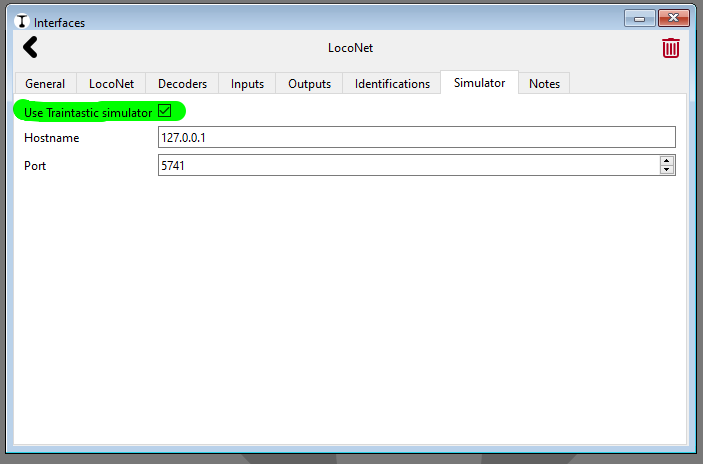
In edit mode in the client, I went to the interfaces menu, I selected DR5000 ( offline as it is switched off), in the simulator tab I checked the “use simulator” chekbox, with hostname “127.0.0.1” and port “5740” (default values).
Going back to run mode, nothing happened, even when trying to start a train with the embedded throttle.
I think I missed something, but what ?

Here is my “.json” file

Reseau_SG.json (4.4 KB)

Can you help me ?

Hi,

The hard part is already done, nice work.

Did you check this?:

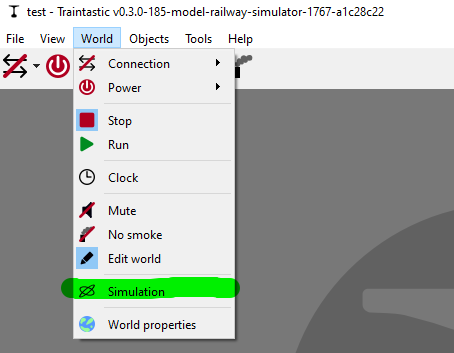
And put the World in simulation mode?:

After that you can put press online and it should connect to the simulator.

If not please let us know :slight_smile:

Regards,
Reinder

Thank you Reinder

I missed the last step “put the word in simulation mode”.

Now it’s Ok, I can control the train in the simulator using the trainstatic client embeded throttle.

Next step : Check the sensors feedback from simulator to server.

Have a good day !
Serge

Hi Serge,

Good to hear it is running now.

To check the sensor events you can use the input monitor, the button is on the LocoNet interface Inputs tab, we driving a train in the simulator these should light up.

Regards,
Reinder

Hi Reinder,

Relying on your help, now I have a full connexion between the simulator and the layout in traintasic client.
The throttles linked to a train in the client, control the trains in the simulator. A click on a turnout in the client switches the turnout in the simulator. Occupency sensors status, from the simulator, are reported into the layout and train moves from block to block are reported. It’s working fine. The input monitor helped a lot for assigning sensors to blocks.

Now I’m going to try scripting.

In a lua script, is there a way to know the state of the next turnout, and witch block is the next one according to the train direction ? Can I read the next signal status ?

How can I increase the acceleration and braking rate in the client throttle ? My layout is small and long braking times are a very inconvenient.

Can I use the latest builts of trainstatic with the simulator ?

Thank you for your help.

Regards
Serge

Hi,

In a lua script, is there a way to know the state of the next turnout, and witch block is the next one according to the train direction ? Can I read the next signal status ?

Unfortunately no, you can read turnout/signal/block state, but it is not yet possible to query a train whats ahead.

What you can do is monitor blocks for entering trains using the on_train_entered event or use the train on_block_entered event.

How can I increase the acceleration and braking rate in the client throttle ? My layout is small and long braking times are a very inconvenient.

These values are hardcoded currently, I can add settings for that.

As alternative you can hold ctrl while adjusting speed, it will be immediate bypassing the acceleration/deceleration logic.

Can I use the latest builts of trainstatic with the simulator ?

Not yet, it is a bit behind on the master version, I’ll make some time to update it!

Regards,
Reinder

Hello Reinder,

With your help, I’m going on with learning LUA scripting. I had a lot of fun, writing scripts and using the simulator to test them.

I got a train shuttle going from one block to the other around the layout. But due to the very low acceleration and deceleration rates, I have to start braking three blocks ahead the arrival block, and reduce the speed of the train to 25 km/h all over the layout. In scripting, it adds lot of complexity. As you proposed in an earlier post, is it possible to have a way to settle those rates ?

I try to use signal tiles as they take into account the turnout states and the occupency of next blocks. But to reach such a behaviour, I had to set for, the signal tiles, the option “require_reservation” to no. Can you tell me what this option is for ?

When I use “world.clock.on_tick” events, I get warning messages in the server log windows. Those messages are for example “W9001 Durée d’exécution 6561 us”. Is there an event for capturing them and get read of them ?

Can I have various scripts acting on the same global variables set ?
Can a script launch an other one ? i.d. Having a setting script for variables initialisation, turnouts positionning … and then this script runs the main script for example, or having a separate script dedicated to actions on events ?

Sorry for such a long post, but it’s where I am.

Greetings
Serge

Hi,

With your help, I’m going on with learning LUA scripting. I had a lot of fun, writing scripts and using the simulator to test them.

Good to hear!

I got a train shuttle going from one block to the other around the layout. But due to the very low acceleration and deceleration rates, I have to start braking three blocks ahead the arrival block, and reduce the speed of the train to 25 km/h all over the layout. In scripting, it adds lot of complexity. As you proposed in an earlier post, is it possible to have a way to settle those rates ?

Thanks for the reminder, I just committed the changes, builds are currently running so they should be ready soon :slight_smile:

I try to use signal tiles as they take into account the turnout states and the occupency of next blocks. But to reach such a behaviour, I had to set for, the signal tiles, the option “require_reservation” to no. Can you tell me what this option is for ?

By default a signal is green if the block ahead is free, if between the signal and the next block are turnouts is stays red until a path is reserved. Using the “require_reservation” no option this can be disabled.

It is a preparation for future automatic driving support, basic automatic driving is planned for 0.5, see the roadmap.

When I use “world.clock.on_tick” events, I get warning messages in the server log windows. Those messages are for example “W9001 Durée d’exécution 6561 us”. Is there an event for capturing them and get read of them ?

Traintastic raises a warning because running the code in the on_tick handler is taking more time than recommended. While the script is running Traintastic can’t do anything else, therefor it warns you. If you reach 10ms (10.000us) the script will be stopped. It is to prevent Traintastic from “hanging”.

How much code do you execute in the on_tick?

Can I have various scripts acting on the same global variables set ?

No, each script runs in its own isolated container.

Can a script launch an other one ? i.d. Having a setting script for variables initialisation, turnouts positionning … and then this script runs the main script for example, or having a separate script dedicated to actions on events ?

No scripts cannot start start other scripts. You can run multiple scripts at the same time, but the cannot communicate or share anything.

Do you want to share (a part of) you script? How many lines is your script?

Sorry for such a long post, but it’s where I am.

No problem at all, I’m glad you ask, this helps to shape Traintastic and gives me an insight on what users want to do with it.

Greetings,
Reinder

Hi Reinder,

Here is my script :

local throttle = class.create_throttle("throttle_1")
local train = world.get_object("train_1")

local horaire_depart

throttle.acquire(train, true)   -- lier le train à la 'manette'
log.debug("Prise de contrôle du train ", train.name)

local canton_A = world.get_object("block_9")
local canton_B = world.get_object("block_12")
local canton_preA = world.get_object("block_10")
local canton_preB = world.get_object("block_11")
local canton_pre_preA = world.get_object("block_3")
local canton_pre_preB = world.get_object("block_4")
log.debug("Navette de ", canton_A.name, "à", canton_B.name," et retour")


-- Fonction : Arrêter le train immédiatement
local function safe_stop()
	throttle.emergency_stop()
end

-- Fonction : Changer de direction (train arrété)
local function set_direction(dir)
	throttle.set_direction(dir)
end

-- Fonction : Définir la vitesse
local function set_speed(kmph)
	throttle.set_target_speed(kmph, enum.speed_unit.KMPH)
end

canton_preB.on_train_entered(function(entered,blk,dir)
--        log.debug("Passage du train :",entered.name," canton ",blk.name," dir ",dir," à ", world.clock.time)
        if dir == enum.block_train_direction.TOWARDS_B then
	       set_speed(10)   -- ralentissement avant arret sur le canton suivant
           log.debug ("Vitesse réduite  10 km/h")
        end
end)

canton_pre_preB.on_train_entered(function(entered,blk,dir)
--        log.debug("Passage du train :",entered.name," canton ",blk.name, " dir ",dir," à ", world.clock.time)
        if dir == enum.block_train_direction.TOWARDS_A then
	       set_speed(15)   -- pre ralentissement avant ralentissement du canton suivant
           log.debug ("Vitesse réduite  15 km/h")
        end
end)


canton_preA.on_train_entered(function(entered,blk,dir)
--        log.debug("Passage du train :",entered.name," canton ",blk.name," dir ",dir," à ", world.clock.time)
        if dir == enum.block_train_direction.TOWARDS_A then
	       set_speed(10)   -- ralentissement avant arret sur le canton suivant
           log.debug ("Vitesse réduite  10 km/h")
        end
end)

canton_pre_preA.on_train_entered(function(entered,blk,dir)
--        log.debug("Passage du train :",entered.name," canton ",blk.name," dir ",dir," à ", world.clock.time)
        if dir== enum.block_train_direction.TOWARDS_A then
	       set_speed(15)   -- pre ralentissement avant ralentissement du canton suivant
           log.debug ("Vitesse réduite  15 km/h")
        end
end)


-- Objectif atteint → Retour
canton_B.on_train_entered(function(entered,blk,dir)
           log.debug("Arrivée train :",entered.name," sur le canton :",blk.name)    -- ," direction",dir)
	       set_speed(0)   -- safe_stop()
           horaire_depart = world.clock.time + 5  -- 5 tick d'attente
           log.debug("Départ vers A prévu à ",horaire_depart)
end)

world.clock.on_tick(function(time)
    if time == horaire_depart then
        if canton_B.state == enum.block_state.OCCUPIED then           -- on repart vers A
            set_direction(enum.direction.REVERSE)
            set_speed(25)
            log.debug("Départ du train :",train.name, "vers A, il est ",time)
        else if canton_A.state == enum.block_state.OCCUPIED then      -- on repart vers B
                set_direction(enum.direction.FORWARD)
                set_speed(25)
                log.debug("Départ du train :",train.name, " vers B,  il est ",time)
             else 
                log.debug("Pas de train à faire partir ni en A ni en B. Il est ",time)
             end   
        end
    end
end)

-- Départ atteint → Aller
canton_A.on_train_entered(function(entered,blk,dir)
           log.debug("Arrivée train :",entered.name," sur le canton :",blk.name)   --," direction",dir)
	       set_speed(0)   -- safe_stop()
           horaire_depart = world.clock.time + 5  -- 5 tick d'attente
           log.debug("Départ vers B prévu à : ",horaire_depart)
end)

-- Positionnement des aiguilles
local turnout = world.get_object("turnout_1")  -- choisir l'aiguille 1
	resultat = turnout.set_position(enum.turnout_position.STRAIGHT)
--	log.debug('aiguille 1 positionnée tout droit' ,resultat)

    turnout = world.get_object("turnout_5")  -- choisir l'aiguille 5
	resultat = turnout.set_position(enum.turnout_position.STRAIGHT)
--	log.debug('aiguille 5 positionnée tout droit' ,resultat)

	turnout = world.get_object("turnout_6")  -- choisir l'aiguille 6
	resultat = turnout.set_position(enum.turnout_position.LEFT)
--	log.debug('aiguille 6 positionnée déviée' ,resultat)

	turnout = world.get_object("turnout_7")  -- choisir l'aiguille 7
	resultat = turnout.set_position(enum.turnout_position.STRAIGHT)
--	log.debug('aiguille 7 positionnée tout droit' ,resultat)

	turnout = world.get_object("turnout_8")  -- choisir l'aiguille 8
	resultat = turnout.set_position(enum.turnout_position.LEFT)
--	log.debug('aiguille _ positionnée déviée' ,resultat)

-- Départ du voyage
      -- on part en marche avant sauf si on est déjà en canton_B
      if canton_B.state == enum.block_state.OCCUPIED then
          set_direction(enum.direction.REVERSE)
      else    
          set_direction(enum.direction.FORWARD)
      end
	set_speed(25)

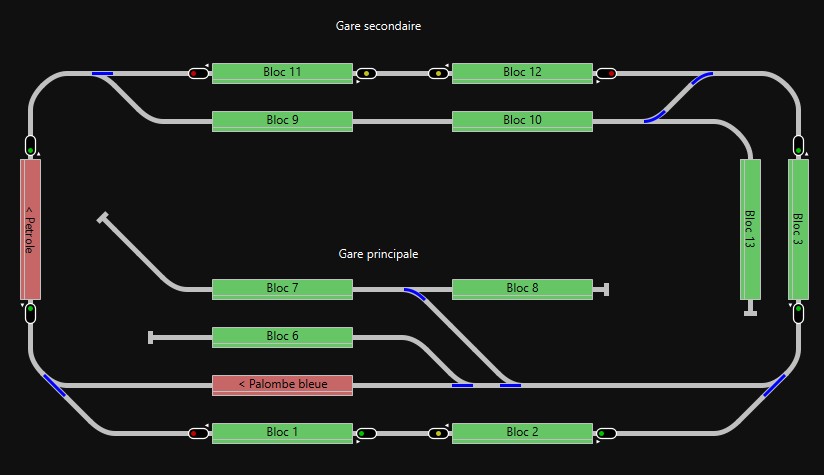
Here a capture of my layout :

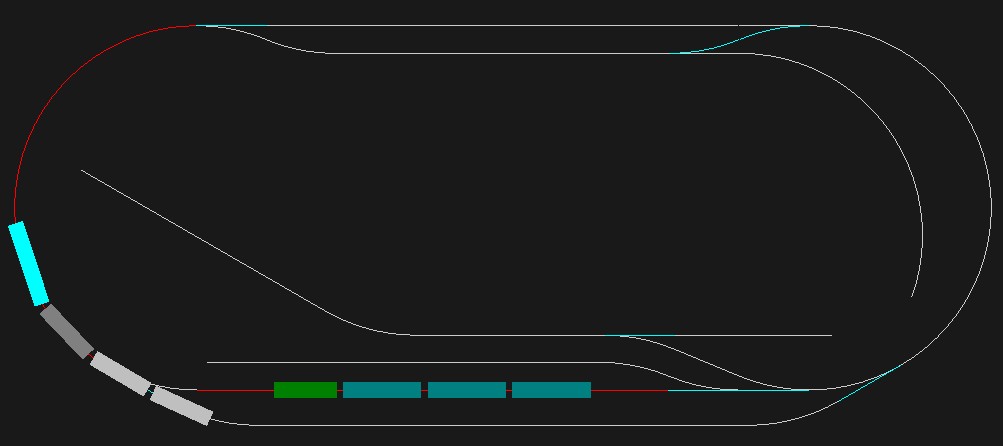
And here a capture of the simulator screen :

For debug purpose and showing the state of the script, I put at least one “log.debug” line per “on_event” subroutine. I suppose that they are time consumming like printf in C langage.

After removing all those lines, there is no more duration warnings.

Regards
Serge

Hello Reinder,

Now things are getting much better as the train speed and the acceleration and braking rates are availables in scripting. I use “bloc.on_train_entered” events for each bloc. Then I can read bloc output signal according to the train direction and control train speed, stopping trains in front of the signal if it is red.

But I have new issues :

  • with two trains going around in the simulator, displaying on client throttles the same speed (40 km/h), one is going faster then the other in the simulator. I think it’s relative to the train max speed. If max speed for train_1 is 80km/h and 120 km/h for train_2, I have to set train_1 throttle on 40 km/h (for example) and train _2 throttle on 60 km/h to have both trains running at the same speed.
    My physical layout is not available for the moment, so I can’t discrminate if it’s the simulator or the client which is not taking into account the different max speeds.

  • when I switch turnouts from the client board window, the simulator is synchronised and turnouts switch to the same position on both windows. When I switched accidently turnouts into the simulator, the client board window turnouts switched also but to the opposite position.

During my tests, the client windows for server messages saturated at 1000 lines. Is there a way to delete initial lines ?

Best regards
Serge

with two trains going around in the simulator, displaying on client throttles the same speed (40 km/h), one is going faster then the other in the simulator. I think it’s relative to the train max speed. If max speed for train_1 is 80km/h and 120 km/h for train_2, I have to set train_1 throttle on 40 km/h (for example) and train _2 throttle on 60 km/h to have both trains running at the same speed.
My physical layout is not available for the moment, so I can’t discrminate if it’s the simulator or the client which is not taking into account the different max speeds.

It is caused by the simulator, Traintastic converts speed/speed_max to the decoder speed step. However in the simulator the maximum speed of each train is the same, so that’s the issue. I’ve added a train speed_max property to the simulator JSON, default is 10.0, so if you set one train to 8 and the other to 12 it should work. The fix is available in Build #1927.

when I switch turnouts from the client board window, the simulator is synchronised and turnouts switch to the same position on both windows. When I switched accidently turnouts into the simulator, the client board window turnouts switched also but to the opposite position.

I’ll need to investigate, do you have the issue with all turnouts or a specific one? Can you show how you setup the turnout and how it is configure in the sim’s json file? (a world export + simulator json is even better if you want to share that, you can send then in a PM if you don’t want them to be public.)

During my tests, the client windows for server messages saturated at 1000 lines. Is there a way to delete initial lines ?

The default limit is 1000 entries after that the oldest are removed when new ones are added, that’s why the number sticks at 1000, a bit useless, better to hide that number column it has not really a function.

Greetings,
Reinder

Hi Reinder,

Thankyou for this built that compensate for different trains max speed. It works ! :grinning_face:

About the turnout, all the turnouts have the same behaviour : synchronised when switched by a click into the client board window and anti-synchronised when switched by a click into the simulator window.

Here after you have my simulator json file and my world export file :

Reseau_SG.json (4.3 KB)

Réseau pliant SG 2026-03-25.ctw (5.9 KB)

May be I did some mistakes in the settings ?

Regards
Serge

Hi Serge,

Thanks for the confirmation :slight_smile:

Found the issue, the turnout command was not correctly simulated, it was inverted, it is fixed in Build #1929 :slight_smile:

It was very nice to see the train running automatically, I ran the Lua script while connecting to the simulator, it worked nicely! Did you have to time/possibility to test it on your real layout? If you like, you can share something here.

Greetings,
Reinder

Hi Reinder,

I started testing my script on my real layer. As expected no problem with connection, driving trains and turnout was Ok.
The troubles I got are on my side and I have to fix my layer : track continuity, lazy turnout …

Nevertheless, I couldn’t run my train as defined. The last wagon did not have detection, so every time in reverse direction, the train was stopping too far as only the locomotive was detected. I exchanged the last wagon with a luggage wagon, with rear light. So as it was detected, the train stopped as expected without any speed or braking rate trimming.

As soon as the layout is fixed, i’ll give you news.

In the GitHub, I saw your bug fix for turnout switching in the simulator, but I couldn’t find build #1929 in development download page, it’s still #1927 the last one.

Regards
Serge

Hi Serge,

Awesome, looking forward to it :slight_smile:

The build is available now, the GitHub action pipeline got stuck. Thanks for the heads up.

Greetings,
Reinder

Hi, why not keeping the start number and increase the number column while also deleting old entries? Sometimes if many messages of same type come together it can be useful to see message number increasing.