MERG CBUS/VLCB hardware support

Tom, this belongs in the MERG forum. There you have more people to help with your problem.

Anyways, it looks like you taught the same event for the three “happenings” (defined by EV#1). If you don’t sort it out yourself, please share screenshots of the event variable configuration for each of those three feedback events.

@DL7BJ / @sven-e I dont have the specs at hand but perhaps the mid-event can also tell something about directionality of the move?
eg

  • event MID → on when servo goes to thrown and passes “mid move”
  • event MID → off when servo goes to closed and passes “mid move”

I think i have seen that behavior above and might be useful for some use-cases?
( thinking of changing frog polarity based on events seen )
But that would probably need more logic than we have today.
Unless someone tells me otherwise: obscure use-case on a rarity.
Servo + frog polarity switch? ¯_(ツ)_/¯

@reinder
If you are thinking of adding sensors for turnouts:
Would it be an idea to gather [ create ] a table of all turnout sensors
and present that “sensor-name” as a pick list when you set up the turnout?

Lets say: create turnout-sensors for turnout East1 [ referencing earlier screenshot ]

Name:CANMIO-SVO101-East1 ( below referenced as $name to keep the table readable)

EVENT ID FCU name FCU State Traintastic state inverted?
25610 $name->Thrown :white_check_mark: :white_check_mark:
25611 $name->Mid :cross_mark: :white_check_mark: :white_check_mark:
25612 $name->Closed :cross_mark: :cross_mark:
-------- ---- ----

Name:CANMIO-SVO101-East2
( below referenced as $name to keep the table readable)

EVENT ID FCU name FCU State Traintastic state inverted?
25610 $name->Thrown :white_check_mark: :white_check_mark:
25611 $name->Mid :cross_mark: :cross_mark:
25612 $name->Closed :cross_mark: :cross_mark:
-------- ---- ----

After that linking this as a “sensor-bundle” would be easy for normal turnouts:
grab the entire “bundle” by name ( resp. CANMIO-SVO101-East1 and CANMIO-SVO101-East2. ) and assign it’s representing turnout.

Deliberate choice: setup the logic first and consider that a complete configuration. Also allow to invert if need be in the GUI when setting up the sensors.
IrDA’s are kinda notorious in by book for needing it.

For the wye turnout it would be slightly trickier →
unless you can break that down again to 2 individual turnouts…
Which it ultimately is..

Double-slips could also be tricky no matter what solution you choose

Both wye and double slips are probably less common so..
Special treatment for these 2 and make the rest as easy pick-able as possible?

Bonus points:
Filtering

  • not used [normal colors]
  • used [ greyed out ]
  • ID or Name

Sidenote:

Based on an Example from jmri setup:
JMRI used to have a grand overview of all (CBUS) nodes and items
[ servo / sensor / Train on track / IrDA end of track ]
On multiple occasions i found myself staring at that screen why bleeping thing was not working.
Ultimately my fault somewhere → 1 board flaky until it corrupted it’s firmware multiple times :sob:

Not sure if you are interested or if it is feasible. But i can see a use-case where a filtered overview might be very handy.
And as long as things have nice pick-able/ readable names → happier days

( but perhaps split this discussion into sensors + new feature: reports ?)

Hi,

I currently use the CANUSB or CANEther CAN ID based on what type of connection is made. A Traintastic CAN ID would be better :slight_smile: I can add it to the settings so users can change it, the default then will be 0x7A.

That would be a nice improvement, then Traintastic can have a mapping node number → cab name in the future :slight_smile:

This is what @sven-e described earlier regarding JMRI and turnout feedback, this also allows you to use a single feedback event for a turnout which might be enough :slight_smile: For polarity switching it is also useful I think :slight_smile:

I started working on the turnout feedback logic, once the first test version is ready, I’ll start a new topic for that. Turnout feedback is useful for other protocols as well :slight_smile:

Using a picklist is possible, but the issue here is that the names are in MMC, they are not stored in the nodes, so the only option then is to do some export in MMC and then an import in Traintastic. I get the idea, I wonder how useful is it. If you configure your node using MMC and simultaneously running Traintastic then you can configure it, test it, and move on with the next one. @DL7BJ, @sven-e what is your opinion on this?

Greetings,
Reinder

Moin Reinder,

Traintastic could read the layoutData.json from MMC, it looks like this for my CANMIO node 256:

"256": {
      "colour": "black",
      "group": "",
      "moduleIdentifer": "A520",
      "moduleName": "CANMIO",
      "numberOfChannels": 16,
      "tokens": {
        "channel": {
          "userNames": {
            "1": "LED 1",
            "2": "LED 2",
            "3": "LED 3",
            "4": "LED 4",
            "5": "LED 5",
            "6": "LED 6",
            "7": "LED 7",
            "8": "LED 8",
            "9": "Button 1",
            "10": "Button 2",
            "11": "Button 3",
            "12": "Button 4",
            "13": "Button 5",
            "14": "Button 6",
            "15": "Button 7",
            "16": "Button 8"
          }
        }
      },

The only thing which must be configured in Traintastic is the path for MMC.

Greetings, Tom

1 Like

That is going to be a heap of fun but maybe I should have a look at mmc

( I am a fcu user and look at the nodejs supply chain attacks with enough hate to avoid for a while :wink: )

I am not sure if ignoring fcu is right
There are more old hands out there that won’t use mmc (yet)

I meant traintastic internal naming but import could be very interesting

Tbh having import features will help to adopt.

Maybe in future more import options from jmri :rofl:

Hi Menno,

sorry, I forget this — I don’t really have a choice unless I start a Windows VM for it. I’m a pure Linux user :wink:

Greetings, Tom

Hi Sven, hi @all

yes, I could ask in the MERG forum.

My intention is different. I want to understand how the PIC controllers and the software work. So it is better for me to work with the source code, the functions, the protocol, and the PIC controllers.

Now it works after I changed from the CBUS firmware to the Universal-VLCB firmware (self compiled), like I did with the I/O module. I only had to change the controller, because the PIC18F26K80 does not have enough ROM. There was no error in MPLAB X IDE, but it did not work with Universal-VLCB.

Now I use a PIC18F27Q83 with 64 kB ROM. I have several different PIC controllers available.

Now everything works as expected with the Universal-VLCB firmware. The firmware also has some advantages, for example you can choose the function - Input, Output, Servo, Bounce, Multi, Analogue, Magnet and LED switch.

The CANMIO has these configured events:

The CANMIO Servo produces and consumes these events:

Pressing the Button 4 and Button 5 results in these bus messages:

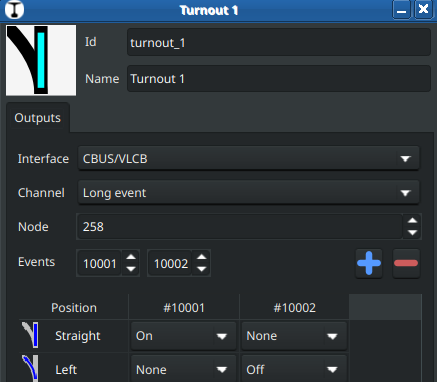
Button 4 - point straight - event 10001 - position evens of the servo 50001 (Turnout), 50002 (Mid), 50003 (Straight)

2026-04-19 19:37:50.284794 cbus_1 D2002: RX: ACON node=258 event=10001 [90 01 02 27 11]
2026-04-19 19:37:50.389833 cbus_1 D2002: RX: ACOF node=258 event=50001 [91 01 02 C3 51]
2026-04-19 19:37:52.639333 cbus_1 D2002: RX: ACOF node=258 event=50002 [91 01 02 C3 52]
2026-04-19 19:37:54.910001 cbus_1 D2002: RX: ACON node=258 event=50003 [90 01 02 C3 53]

Button 5 - point turnout - event 10002 - position events of the servo 50003 (Straight), 50002 (Mid), 50001 (Turnout)

2026-04-19 19:36:20.038627 cbus_1 D2002: RX: ACON node=258 event=10002 [90 01 02 27 12]
2026-04-19 19:36:20.097755 cbus_1 D2002: RX: ACOF node=258 event=50003 [91 01 02 C3 53]
2026-04-19 19:36:22.347283 cbus_1 D2002: RX: ACON node=258 event=50002 [90 01 02 C3 52]
2026-04-19 19:36:24.618228 cbus_1 D2002: RX: ACON node=258 event=50001 [90 01 02 C3 51]

If have two points from the beginning with Traintastic on my board. They have currently no interface settings. If I try to set the interface to CBUS/VLCB this happens:

2026-04-19 19:39:09.642264 client[127.0.0.1:59900] I1003: New connection
2026-04-19 19:39:24.038253 world N1010: Edit mode: enabled
traintastic-server: /home/tom/projects/linux/traintastic/server/src/hardware/output/map/outputmap.cpp:119: OutputMap::OutputMap(Object&, std::string_view)::<lambda(const std::shared_ptr&)>: Assertion `addresses.empty()’ failed.

I delete the both points and insert new one in the board.

With these settings it’s runs with the button 4,5 and a mouse click in Traintastic, full servo control with produced events for the position of the servo.

You can find my complete firmware projects at Github. The Universal-VLCB has submodules, the bootloader, VLCB-defs and VLCBlib-PIC. The projects are setup for MPLAB X IDE v6.25.

This is exactly how I imagined it! :tada:

Greetings, Tom

1 Like

JMRI uses a table for sensors (and turnouts, etc). Here each sensor is given names and protocol specific information such as event ID (node number + event number) for CBUS. These sensors can then be selected for turnout feedback (etc) in a drop down list.

This is one way of doing sensor feedback. This is of course annoying as I have to enter sensor names again. As far as I know there is no import of events from FCU or MMC to JMRI. There is a feature in the CBUS part of JMRI where events can be captured as they are observed by JMRI and then given names. This can be done in Traintastic too, but I am not sure that is the best way forward.

In Traintastic you set up turnouts with raw information (that is specific for each interface type). I think you can follow this design with feedback sensors/events. For a turnout you have an “output” tab. I expect you will add a “input” or “feedback” tab. Such a tab could contains similar information as you have for “output” today. Such a “feedback” tab would be consistent with the “output” tab. I think this is the easiest option to implement and it will be easy enough to use.

If names for events is necessary, I think that can be added later. This will require lots of thoughts on how to design it to be usable.

@DL7BJ, great to see you got your module working the way you want it. Interesting to hear your story how you get there. You are really a power user!!

I am very fond of CANMIO-Universal. It is very capable. It can mix many types of input and output channels. CANMIO-SVO can only use servos and digital inputs. Adoption of CANMIO-Universal has been slow as there is limited support in FCU. MMC works very well with CANMIO-Universal. I only started using CANMIO-Universal when we got the module definition file (MDF) working for CANMIO-Universal.

Interesting to see that you use two different events for setting the turnout. And credit to Traintastic that allows you to do that!!

Btw, there is a new CBUS panel module (CANPAN3) that will soon come to the MERG kitlocker. It will allow a pair buttons to work with a single event. One button sends an ON event and the other button sends an OFF event.

1 Like

Hi,

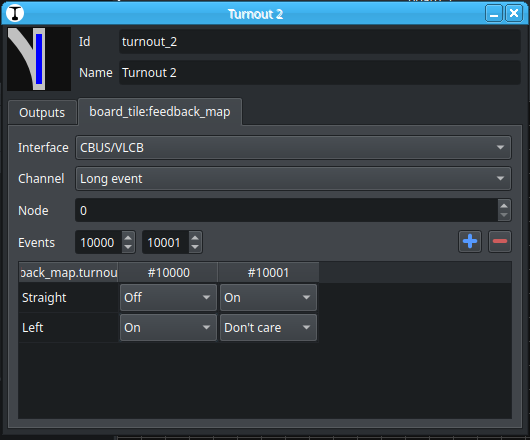
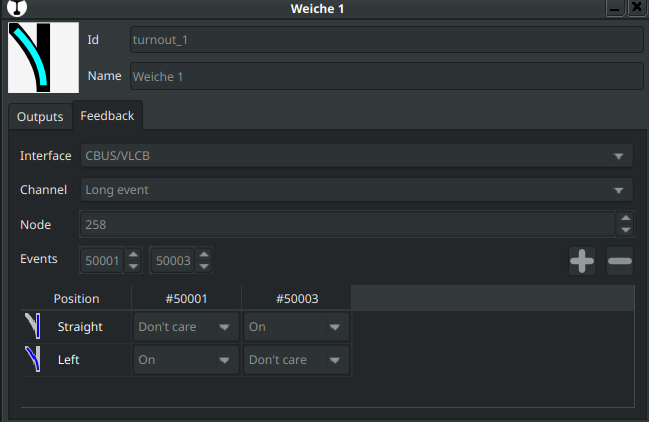
That’s what I’m thinking too :), sneak preview:


Options per input are: Don’t care / On / Off

The interface has to be set again, as feedback can use a different interface on some layouts, e.g. using a HSI-S88 for feedback and something else as command station for the accessory/turnout commands.

Short update, time to sleep :zzz:

Greetings,
Reinder

1 Like

@reinder That looks great. A few small thoughts:

  • Why the long name “board_tile:feedback_map” ? Is this just a name because you haven’t added a language translation yet? I expect this to say something like “Feedback”.
  • What if you don’t have any feedback? Will the turnout tile change as you click? (As it does today)
  • Assuming that the tile will change on click if there is no feedback, the choice of 0, 1, or more feedbacks looks much better than the JMRI where you have to first select how many feedbacks you have for that turnout, and then the appropriate input widgets open. This is much more seemless.
  • When you have to enter the interface every time, can you make the last interface choice “sticky”, i.e. next time a dialogue comes up, the interface will be pre-set to what you set last time? This whould help usability.
  • You have two choices: Straight and Left. Can you add “Blank” or even “Flashing”? This would indicate that the turnout is moving between the endpoints. I think it would fit in nicely with your design. Not critical for functionality, it just would look nice. Can wait for later.

I am eager to try it.

1 Like

Hi Sven,

Yes, that is an translation placeholder. It will be named “Feedback”.

Yes, if you don’t configure a feedback interface it will assume it was successful.

Yes that would help indeed, this applies to everywhere an interface need to be configured. I think best is to add World settings for it. When an interface is added (using the wizard, it can ask to set is as default interface for new objects that are created.)

My idea is: if the current input state doesn’t match anything in the list, the turnout position is Unknown. If it will blink/have a different color etc. is up to the user interface settings. (Just like there are two options now howto draw turnouts.)

Greetings,
Reinder

@reinder / @DL7BJ :heart: the CBUS HUB!!
I think traintastic hub may be faster and more reliable JMRI’s edition → I have seen no timeouts … Didnt put a stopwatch on it but it seems to perform wel retrieving my config.

1 Like

@sven-e I’ve modified the feedback matching logic a bit, it should work with Don’t care+On mapping, can you give it a try? (You need build #2011 or later)

@MZwa good to hear the Hub performs well :slight_smile:

Thanks Reinder. It works much better. However there is one glitch where a turnout is not updated correctly and its tile is left blank. This happens after this sequence of feedback events:

2026-05-01 11:55:31.653770 cbus_1 D2002: RX: ACOF node=300 event=182 \[91 01 2C 00 B6\]
2026-05-01 11:55:32.292531 cbus_1 D2002: RX: ACON node=300 event=182 \[90 01 2C 00 B6\]
2026-05-01 11:55:32.300372 cbus_1 D2002: RX: ACOF node=300 event=180 \[91 01 2C 00 B4\]

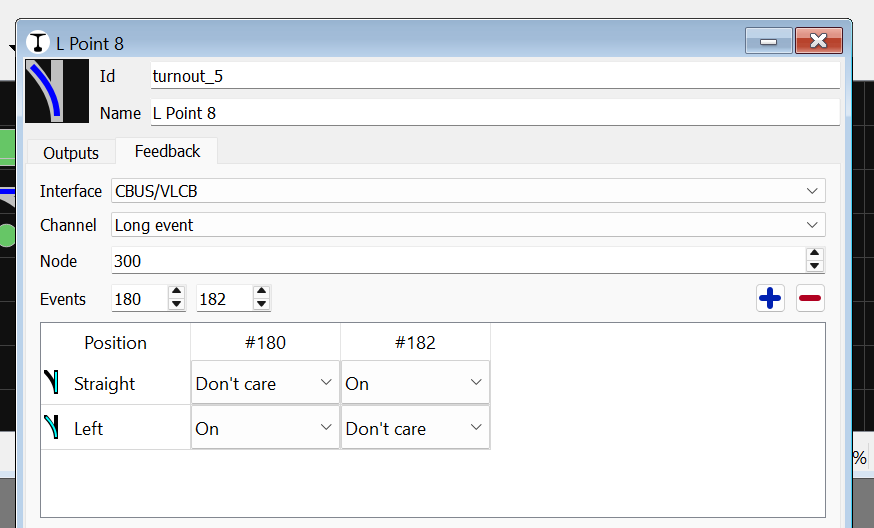
The configuration for this turnout is this:

I don’t know why the ACOF event=180 comes after the ACON event 182. It only happens for this turnout.

The use case that causes this is where I have a route button that sets three points. This is one of them. There is also a dependency between these points where this turnout must be set straight if another turnout is set to reverse (right). If this turnout is already set to straight there will be a feedback for the one of the feedbacks, but it should only be for the ON event. I have to check my setup.

Moin Reinder,

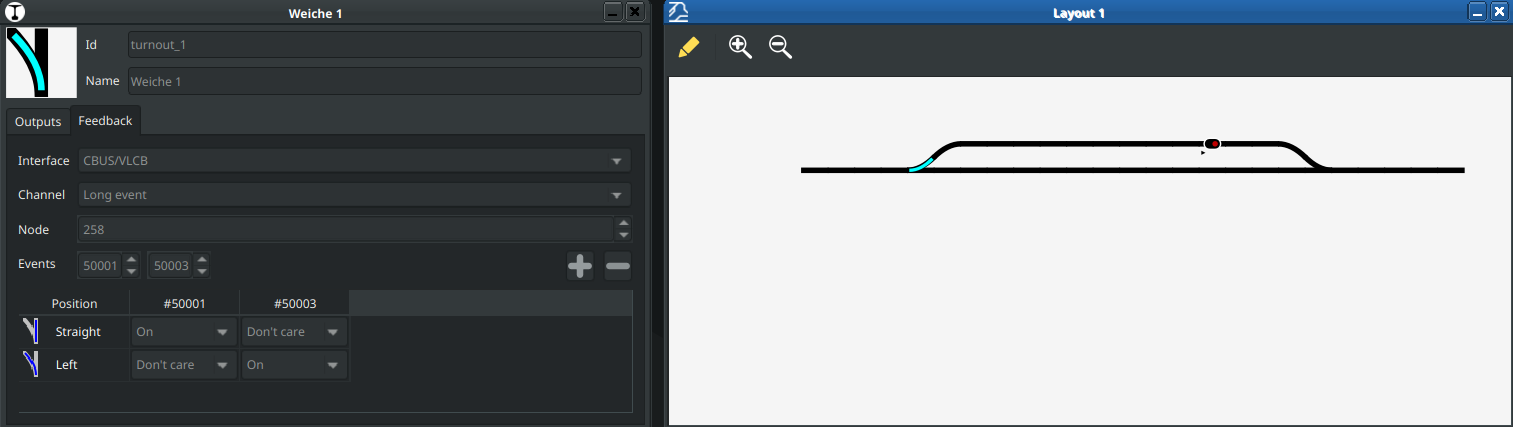
I have accidentally swapped the feedback events. The real state is straight. I correct the feedback events:

But I have no chance to move the servo, because Traintastic means the state is correct and a click on the turnout does nothing.

I think we need for this dialog a test button on the output tab to switch the port behind the settings for straight and left or better a click on the turnout symbol in the property dialog to send the event, regardless of what the feedback event reported.

grafik

Actually I use a key on my CANMIO node, but better is a “manual override” function. This could help with the setup of the turnouts and if the turnout has not the position, which it should have.

Greetings, Tom

PS: The server runs on my Raspberry, I start the client on my PC, so the problem with the client on the Raspberry is not a server problem.

Hi,

The OFF event is the issue here, because it is received after the ON event this event “wins”, but as there is no match in the table it will set the position to unknown. I’m not very familiar with MMC yet, but could the order in which the events are defined in the node have influence?

Hmm, that is an issue now indeed, now we have a deadlock.

I think a test button per row in the table is best, clicking on the image is nice, but only works if there are two states, when you have more you an extra menu. A dedicated test button is also easier to understand for users. As edit mode is required to make changes it is also a requirement for the test button. The test button then always execute the commands regardless of the state of the turnout/signal.

Nice, that is good to know, this confirms what we were expecting :slight_smile:

Greetings,
Reinder

I am really puzzled by this. The OFF event should happen as soon as the servo starts moving. So it doesn’t really matter which order the events are defined. I will try a few things after the weekend. The problem is probably with my hardware.

The funny thing is that JMRI is fine with this behaviour. I think it keeps the state for the two feedback events and then just match up when something changes. It might be confused for the brief moment when both feedback events are ON. This will also require some more investigations.

The ball is with me on this one.

Hi,

I’ve tested the Z21App for iOS in conjunction with Traintastic and the CANCMDB command station. All you need to do is add an interface for a Wlanmouse in Traintastic and enter the IP address of the computer running Traintastic in the Z21App. This allows you to use the Z21App in conjunction with CBUS for control.

Personally, I’m not particularly keen on smartphone apps; I find handheld controllers like the CANCAB2 more practical, as you don’t have to keep looking at them. But this does offer a modern alternative for control via WLAN.

Greetings, Tom

1 Like

I was doing some testing a few weeks back, and if I remember correctly, my feeling was that JMRI was ignoring the OFF events, and simply reacting to the ON endpoint events; ie when the first OFF event was received, JMRI did not change the state to Unknown / Inconsistent, it stayed as it was until the other endpoint ON event was received and it then updated. In fact, I think I tried sending both ON events and the point just changed, rather than going Inconsistent.

This doesn’t make it right, but may explain why JMRI is more forgiving of this situation.