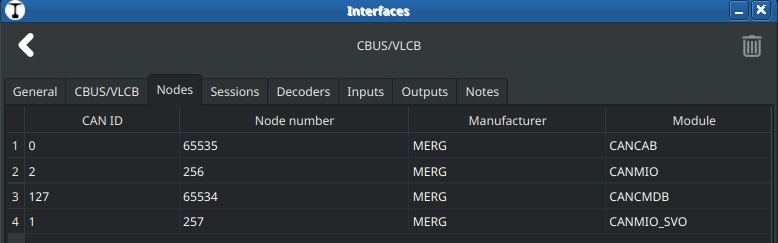
it’s defined (or reserved) in the specs but the CAN code (asm) says this:
; filename CAN_USB4.asm 15/09/14 ; Uses 4 MHz resonator and PLL for 16 MHz clock ; This interface does not have a Node Number
The code is well documented, I can’t see anything, which could change the data. It’s transfered 1:1 from CAN to USB and vice versa.
The CANUSB4 has two PIC controller, one for the CANBUS and one for USB. This parts are the same as my interface, I changed only parts for isolation. The CAN controller firmware is Assembler, the USB controller firmware is C. The USB controller code is derived from original Microchip code and FTDI FT245 replacement code from SPROG DCC https://www.sprog-dcc.co.uk/ I don’t know why they use no FTDI chip for USB.
The assembler code can not used with MBLAP 6, because MPLAB 6 use the newer pic-as assembler. The code was written for mpasm. There is a document from Microchip to port the code from mpasm to pic-as. pic-as produces relocatable code, that’s a problem with the existing code. I have had starting to convert the code, but I must made some errors with the page switching, PIC and assembler are new for me. At the moment I use the original code on my interface.
The node number is ignored by the node, because the event 1234 is configured as a short event. Always with configured short events the node number is ignored by the node - I read a bit about that at MERG forum. I don’t know if nodes (kits from MERG) exists without configuration of short and long events. In the past, much has come about through extensions, and there are several posts in the forum that mention that the node number 0 was previously used to distinguish between short and long events.
Reinder, what’s your opinion on making this configurable in the CBUS/VLCB interface?
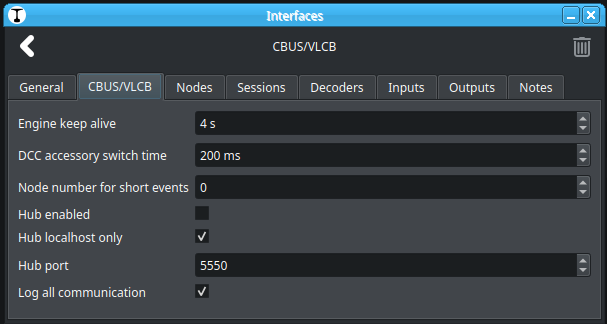
Node number for short events (default 0):
Is that a lot of work? The firmware of my (and your) CANVOUT is the newest Univeral-VLCB, it could be that older nodes or SliM nodes need node number 0 for short events.
Thanks @DL7BJ for announcing Traintastic to MERG membership. This is a very interesting project. I’d like to help out as much as I can here. I am a member of the VLCB team and use MMC extensively on my layout. I use JMRI for layout control and automation but am looking for somethings simpler, that also supports CBUS/VLCB.
First, one note on terminology, FCU is a PC application for configurating CBUS nodes in FLiM mode. I see the word “FLiM” used instead of “FCU” above which can be confusing. SLiM is a different mode which the CBUS nodes start up and does not require a computer for configuration but instead uses on-board switches. FCU (or MMC) can then be used to assign a node number and transition the node into FLiM mode. MMC is also a configuration program that does the same job as FCU but in slightly different ways.
Some clarification on node number 0: Yes, as you have alread stated node number 0 is used by SLiM nodes. It is also the node number you see in FCU (FLiM Configuration Utility) Software Node. Keep in mind that this Software Node is a FCU feature to manage “short events”. Any events created in the Software Node will be “short events”.
FCU has this software node to be able to drag-n-drop events to CBUS nodes. MMC does not need this software node as events are “taught” by entering the event ID (node number and event number) or selecting an event in the event list and then teaching it to a node.
A side note, FCU can actually allow more than one software node. There is a setting for these to use a different node number than the default 0. This is not a recommended practice but used by some people to group events on very large layouts. MMC has a “group” feature instead.
Short events use a different set of OP-codes to Long events. ASON/ASOF instead of ACON/ACOF. Other than that they have the same parameters. Short events have a node number which should be set to the sending node, but is ignored by the receiving node.
There is a lot of discussion on the MERG forum about the benefits of short events and long events. Long events are convenient as they are generated by producer CBUS nodes without any configuration (other than setting the node number). Short events must be configured using FCU or MMC. As FCU uses the Software Node with short events a lot of people use these. JMRI uses a shorter text string for entering a short event than for a long event which makes short events appealing to JMRI users.
Regarding the feedback events from CBUS nodes that use servos. Yes they provide three feedback events. “At ON”, “At OFF” and “Mid point”. @MZwa has the sequence correct in his post from 16 Feb. Not all of these need to be used by Traintastic. @reinder seem to be confused by this. JMRI has three options:
Direct feedback. The turnout icon changes when it is clicked and the command to change the turnout is sent. No feedback is involved here.
One Input. One feedback event is used to update the turnout icon. This would be the mid-point event.
Two input. Here we use two events, the “At ON” and “At Off”. As Menno says there is an OFF event for “At ON” that indicates that the turnout is no longer in the ON position. The turnout is now slowly moving to the OFF position. When the turnout has reached the OFF position an ON event for “At OFF” is sent. And for the opposite direction swap the OFF and ON here. JMRI uses this information so that when the first OFF event is received it blanks out the turnout icon, i.e. it does not show either closed or thrown. Only when the next ON event is received does the turnout icon show the correct position. I like this feature as it tells me that the turnout is moving and you cannot run a train through it.
What I am missing from JMRI is a feature to show the turnout icon flashing while the servo is moving. I have seen some physical panels where the turnout position LEDs are flashing alternatively while the servo is moving.
That node number is not really used. CANUSB will just pass through the node number from Traintastic. It does not alter the messages at all. CANETHER doesn’t alter the message either.
It has been discussed in the MMC group if it should have a node number to be used for short envents. This would be useful to identify who is sending the event in case you have more than one PC program that sends events. Say that you have MMC or FCU running at the same time as Traintastic. So it would be useful to be able to set the node number for short events in Traintastic. MMC doesn’t let you configure this at the moment and uses 0. FCU uses the node number for the software node the event is stored in. So there is no precedence for setting this node number in Traintastic. I would ask you to spend a lot of time on this.
I hope I have clarified more than I have confused things now. Please let me know if there are anything that needs clarification.
I read a lot of them and was more confused as before But I did understand it reasonably well in the end.
However, I must admit that I didn’t look into SLiM mode in detail because I don’t want to mess around with DIP switches and FLiM offers more possibilities.
That’s a very nice idea! Something for the todo list.
If the other software uses the Traintastic hub, and I understand it correctly, then the best approach is for the hub not to modify the node number of the sending software. This way, each application can use its own node number.
Thank you very much for the information and the explanations.
Welcome to the Traintastic forum @sven-e, thanks for joining and your interest in Traintastic!
Thanks for the additional explanation about turnout events, it is clear to me now I like the idea of a flashing turnout while moving.
Traintastic has already a setting for that @DL7BJ suggested it, so it has been added recently. The current default is 0, but that is also MMC’s default we might consider changing it. How do users generally number their nodes, just 1, 2, 3, 4, etc. ? Then it might be better to choose a high node number.
If more settings are required I can add them easily.
The CBUS/VLCB Hub in traintastic just forwards the messages as is, the hub doesn’t even know it is CBUS/VLCB it works on CAN message level. (So I can reuse it for other CAN bus protocols, e.g. the already implemented MarklinCAN or maybe in the future NMRA LCC / OpenLCB).
Today I received a package from @DL7BJ (as donation ), with a CANUSB4, CANCMDB and CANCAB2 kit and a prebuild CANMIO, soldered the CANUSB this evening and did my first CBUS test myself
Thanks Tom and Reinder for the welcomes and your thoughts.
I agree that SLiM mode is less interesting. I find it tricky to keep track of all events that have been taught to the CBUS nodes. SLiM was a good thing in the early days of CBUS as there wasn’t any configuration utility. But today when we have both FCU and MMC FLiM mode is used by the majority of CBUS users.
Thanks for the pointer to the Interface configuration dialog. I have set the node number there now and see it propagated. Great! And thanks for the tip about the hub feature. Will try that soon. It is good to have options on which hub to use.
There are no guidelines on this. FCU by default suggests numbers starting at 256. This is to avoid collision with SLiM nodes (which I don’t use) that typically have node numbers in the range 1-255. As you have seen there are some reserved fixed node numbers for CANCMD (command station) and CANCAB (hand controller).
I generally use blocks of 100 for each station or operation area. This is a way of grouping my nodes. This is not really necessary as the assigned names can be used to group the nodes in many ways. MMC is very good at filtering on portions of names.
I think it keeping the default of 0 for Traintastic is fine. It is only silly people like me who have a wish to distinguish sources of short events.
Reinder, have fun with your CBUS kits. Let us know if you have any problems.
Yesterday I managed to have a setup of Traintastic controlling my small demo layout. I was surprised how quickly I got it going. And the CBUS support is very good. It sets my turnouts and I have some sensors (both block and spot) which all work fine.
I have recommended people to use RocRail with their CBUS layouts if they don’t want the complexity of JMRI. I am going to recommend Traintastic instead from now on.
The biggest feature wish is to get feedback from the turnouts. I listed the three modes JMRI uses for turnouts. For now I would be happy with the simples one with just a single feedback event. There are a few reasons for this wish.
I use my computer together with physical control panels. If I change a turnout on that panel I want the turnout position to be updated in Traintastic.
Update the Traintastic panel at start-of-day. CBUS nodes have a mechanism to report its state at the beginning of a session. These nodes react to a “start of day” event by sending the feedback events for a turnout. These events are used for the panel to update the indicator for turnout positions. I have this working on my physical panel (LEDs) and in JMRI.
I use “routing events”. A single event from the panel (such as pressing a route button) makes several turnouts change. Yes, I know that I can send many events from a turnout or a button in Traintastic, but this is not the CBUS way. The idea is that an event reflect that something changed, a sensor or a switch. A number of nodes can then subscribe to that event. I.e. a one-to-many relationship.
So for this routing event, I press a button on the panel. Some turnouts change in response to this. Their feedback events are sent which update the panel.
If this can be done today, then please let me know. I cannot find this in the documentation or in the setup dialogue for turnouts.
I will probably come back with more feature requests as I get deeper into Traintastic.
we need a sponsored MERG membership for Reinder! There are new questions in my thread, that I can’t answer myself.
Example:
Any idea about if/when feedback will be available. Is it possible to implement it today in LUA.
Another question. How is the definitions strored ? In text/JSON files - that can be generated by AI/LLM’s ?
I will ask later, if they could ask these questions here. I think the main development forum for Traintastic is here, not at MERG. At MERG we could answer questions for the usage. It’s a bit difficult to always convey everything correctly. How?
I will, need to do some soldering first made this evening a start with the CANCMDB
Thanks! My goal is to build something that is easy to start with, but also powerful for users who want to go the extra mile.
Turnout feedback is not yet supported, but I have a plan, now I just need to build it (so I can work for CBUS/VLCB and other protocols)
The “start of day” event, @MZwa also mentioned that, is that also something Traintastic needs to support? (Currently a switch on the board can facilitate that)
Please share them here on the forum in the Feature Requests category.
Turnout feedback, I’d hope within a week or two.
No, it is not yet possible to receive CBUS/VLCB messages in Lua, but I’m think about adding that.
If definitions is World, a world is stored in a xz archive file which contains two JSON file, one with the world data, one with all state data, if Lua scripts are used, they are stored as .lua files.
I don’t know, but it must be exactly right including references etc. to work, so it might me hard. What is the use case?
Yes main development is here. General usage questions and CBUS/VLCB can probably answered on the MERG forum. What I see on most Dutch forums regarding to software is that basic questions are answered, but for more advanced questions the advice is usually ask it on the forum, the experts are there. I think for Traintastic this will be the same.
My goal with this forum is to share knowledge/ideals about Traintastic, overtime experts will arise who can help other users
No. A start-of-day event is just any event that is sent at the beginning of a running session. It can be created by a button in Traintastic or a physical panel. It can also be created by some of the CBUS modules such your CANCMDB when it is powering up. So nothing magic about it at this stage.
The only special thing about a start-of-day event is how it is taught to CBUS nodes as it is configured to so that when the node receives this event it sends out its feedback events. So the special thing happens in CBUS nodes. Traintastic doesn’t need to do anything special here. It will just receive these feedback events and update turnout positions on the screen, just like when they come one by one when a turnout is changed.
A lot of people are confused about this concept and believe that the start-of-day event is special. It is just an event like any other. It is only how it is taught to CBUS nodes that is special.
Yes. This advice is similar to advice to JMRI users. If there are questions on JMRI beyond CBUS it is recommended to use the JMRI forum. People need to be reminded now and then. Just as people register to the JMRI forum I think they should register here as well.
I am also trying to find a way to give you Reinder access to the MERG website and forum so you can find current information about CBUS and VLCB. Until then please ask Tom or me. You shouldn’t have to pay the membership fee for this. Your work on CBUS is so valuable to MERG members.
And on that note I’d like to highlight the work we are doing for VLCB. VLCB is the next generation of CBUS. It is fully compatible, just adds a few features for trouble shooting and improves the documentation. See GitHub - Versatile-LCB/VLCB-documents: The specifications and documents for VLCB · GitHub . Yes, there are lots of documents there that duplicates what you have already learned from the CBUS User guide. Unfortunately the CBUS User guide is not clear on some details and people who read this interpret it differently which has led to strange behaviour in some CBUS modules. The VLCB documentation tries to be clearer here. What you have done works fine so you don’t have to re-read everything. It is just if you are confused about something then you might find the answer in the VLCB documentation.
Will try and put up a bit of a demo for our next ANZ merg meeting
I think what i tried to say is: Start of Day can have an impact and traintastic ought to be aware ( Start of Day may throw turnouts/set set signals whatever )
Traintastic does not need to support it ( until CBUS support becomes a replacement for Flim configuration / MMC ). Eh no, lets keep it simple
However i think it might be wise to perhaps have Traintastic initiate it’s own “Start of Session” by setting all critical items in the world to it’s know/cached state. That is: on all busses (!) sidestepping any problems with busses that do not have a start of day
Clear, a short section in the manual which explains howto set it up would be sufficient then.
As with detailed CBUS/VLCB questions, they can better be asked on the MERG forum as the experts are there
Thanks! that would be great.
@DL7BJ pointed me to that documentation, I used the two side by side during the development. But prefer the VLCB spec, as it is much more clear.
A few questions I have (more will come )
the minor priority is documented by the VLCB specs, Traintastic has a lookup function for that but the major priority, Traintastic currently sends everything with the lowest priority. When would you use a higher major priority?
If multiple CANCAB’s are connected to the CAN bus, do they all have different CAN ID? (their node number is fixed I think), is this CAN ID persistent?
Is it possible to give a CANCAB a name? (e.g. Sven/Tom/Menno/Reinder) that would be nice to display in Traintastic: “Class 66 controller by CANCAB name.”
That would be really nice, I’d hope it is not to soon so I can finish tunrout feedback in time :slight_smile
Yes, that is something that is needed too, most other busses/protocols don’t have flexible configuration like CBUS/VLCB.
No, there is no confgurable name for the CANCAB. The CANCAB gets a session number from CANCMDB, if a loco is selected. All the communication is based on this session number.
In MMC you can give CANCAB a name, but it is lost after reconnect, if the CANCAB2 is deleted within MMC. Just trieed it. Better were, the name given with MMC will be stored in CANCAB and used if it reconnect. I will note it on my to-do list, if that could be possible.
I couldn’t find anything in the specs either so I think it isn’t possible at the moment. Other option would be a node parameter throttle/cab id, if it is e.g. a uint16 you set it for each CANCAB to a different value (e.g. your MERG member id), then create a lookup table in Traintastic in the CBUS/VLCB interface settings for id → name
Agreed. JMRI has implemented CBUS node configuration for some boards. This is pretty half-hearted at the moment and only used by people who can’t run FCU (which only runs on Windows) and haven’t adopted MMC yet. This is a massive job. Leave that to MMC and FCU which do a good job here.
Yes, that is another side of view of the Start-of-Day problem. I think saving a last-known state is tricky to get right, and it won’t be correct if the layout has been changed while Traintastic was shut down.
An alternative is to set all turnouts and signals to a pre-defined state. I am sure Traintastic could do that. The CBUS way is to use the single start-of-day event and teach it to all the turnouts and signals to be set a particular way. This is actually used where some CBUS modules (such as solenoid turnout motors) do not have any feedback events.
The two CBUS methods (start-of-day event triggers feedback events, and start-of-day event sets all objects to a given state) would only need a push button in Traintastic.
Thanks for that feedback. It justifies our work on these documents.
The major priority is not really used. It is there for future uses where some messages must be delivered. See below on CAN message arbitration.
Every CBUS OP-code has a defined minor priority. This is to let important OP-codes have right-of-way on the bus. You don’t have to implement the minor priority for CBUS commands. use the LOW priority (all ones) instead.
Each CANCAB will have unique CAN-IDs. They support “self-enumeration” which means that if its CAN-ID is already used it will find a non-used CAN-ID and use that. (The process is complex and some older CBUS modules don’t support this.)
By the way, unique CAN-ID’s are not critical. CBUS works quite well even if there are duplicate CAN-IDs. The only problem is when two CBUS nodes send messages exactly at the same time. The CAN-ID is used to arbitrate between to sending nodes. The one with the lower number will get right of way.
This CAN message arbitration is done in hardware and it includes the priority bits. Lower priority number has higher priority on the bus.
A side note about what CAN-ID to use in Traintastic. You should use a high number. The next available is 0x7A. I am happy to get this registered for you.
As Tom says, you can give the CANCAB a name but this doesn’t make sense as all the CANCAB’s are in SLiM mode and use the same pre-defined node number. So there is no way of distinguishing the CANCABs.
As Tom says, you could identify the different CANCAB’s using the DCC session number. But you only have such a session number if you have selected a train.
The VLCB team is looking into this. We want to extend the CANCABs so they have a node number, and thus run in FLiM mode. You can then configure each CANCAB from FCU or MMC. But this is a long way away. We haven’t started on the DCC service documents yet.


 , it is quiet easy due to Traintastic’s reflection model
 ), with a CANUSB4, CANCMDB and CANCAB2 kit and a prebuild CANMIO, soldered the CANUSB this evening and did my first CBUS test myself