Turnout feedback is optional but can be used with any system. Using different interfaces for control and feedback is also supported. e.g. send accessory commands via XpressNet, read feedback using a HSI-S88
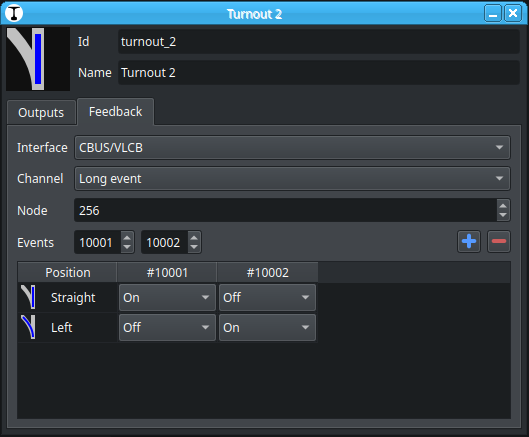
All turnouts have a extra tab Feedback where feedback logic can be mapped similar to the Output tab.
If a feedback interface is configured, the turnout position is determined by this mapping, if none of the entries matches the turnout is in the Unknown position.
Thank you Reinder for this feature. Tried it now and it works the way I hoped. It was easy to set up and fix when I got the direction wrong. I use two sensor feedback and Traintastic shows the turnout tile as blank while the servo is running. Nice.
However I have a problem with “start-of-day” when all turnouts report their positions. They do so by sending out “ON” events for the turnout position. I.e. just one of the two feedback events. Traintastic seems to be confused here and does not update the turnout tile, it remains blank.
The server console shows a few of these messages here:
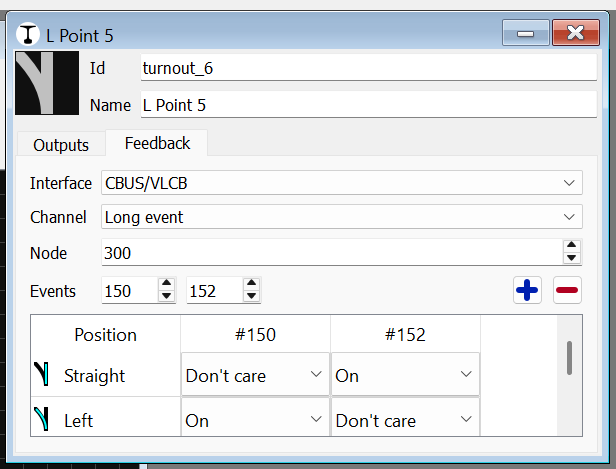
Traintastic logs E3011: Feedback conflict: multiple options are valid if e.g. if the last seen value of both events is ON, then both match, so it doesn’t know what to do. You should change the Don’t care values to Off. Because one virtual switch must be ON and the other OFF for a position.
When Traintastic goes online it requests the state of all short/long events, does the servo module respond to that?
I see the requests on startup (AREQ and ASRQ) and yes, there are answers but not not always the answers I expected. I will investigate this. Event requests is a feature that is not used much so there may be bugs here.
And the start-of-date events (which only send the ON events) are coming through.
I changed the Don’t care to Off as you suggest but this did not improve anything. I guess the problem is that there are no OFF events here.
I thought that Don’t Care would mean that the missing OFF event would be ignored when an ON event is received by Traintastic. Would it be possible to change the logic in Traintastic to do that? This bit works in JMRI which I take as it would be possible.
That is good to know, my idea was to request all when going online so Traintastic knows the current state of all events.
As long as Traintastic doesn’t receive anything for an event it considers it Unknown, so that won’t be a match with the (truth) table when using On/Off.
What does the startup log look like? How does the servo module respond to the requests?
(Via the server settings file logging can be enabled, on Windows the log file is stored in %localappdata%\Local\traintastic\server\log)
Currently it works like this:
If one input(/event) changes its state, it will check all used inputs(/events) against the map.
If there are zero matches → position is Unknown
If there is one match → position of match
If more than one matces → position is Unknown + log error message
I think this is a proper workflow when “normal” inputs are used, the CBUS/VLCB events are a bit different. So we need to tune the logic a bit.
The dropdown is under the hood just an enum, so we can add more options to it (or different options in case of CBUS/VLCB events)
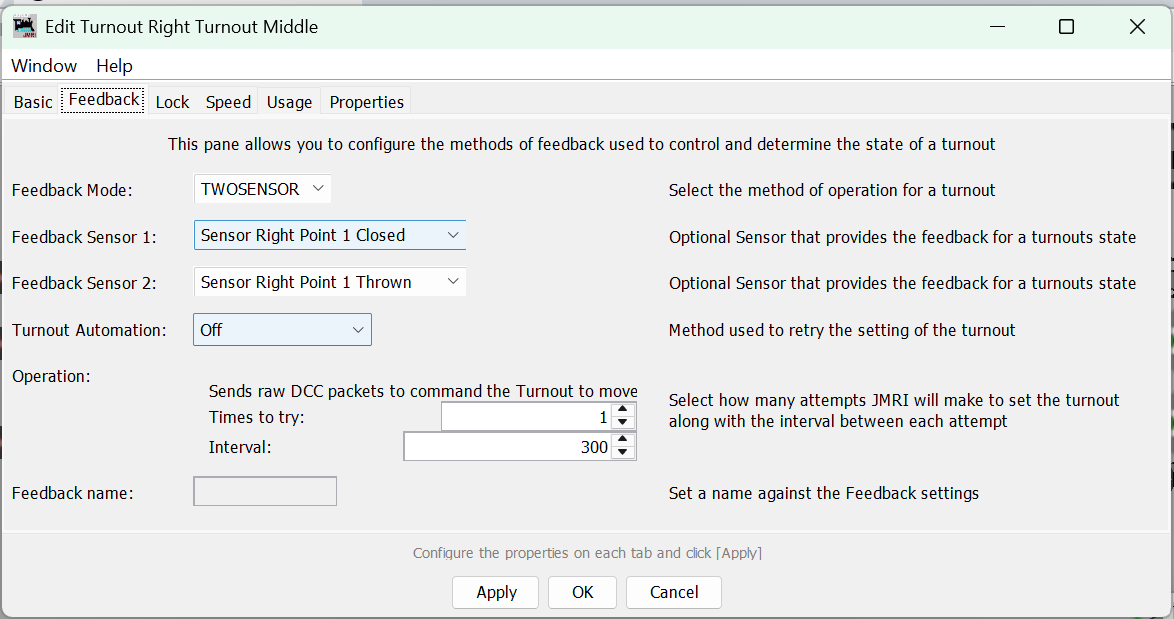
How do you configure it in JMRI?
We can e.g. use the last one wins, for a normal turnout that will work.
@MZwa also has a 3 way turnout, I wonder what that feedback map looks like
In my situation for the three way turnout I would split in 2 separate turnout sensor sets and probably ignore centre.
Can’t test and show because my railway and computer are ~ 400 kms away from me
I select TWOSENSOR and two feedback sensor dropdowns show up. Note here that the sensors are named as was discussed earlier.
I have seen code in JMRI so that when one feedback sensor is received at ON then the other sensor is set to OFF. I don’t remember if this is CBUS specific code or general JMRI.
Yes, that would work. Sounds a bit too simple. Are there any edge cases here?
Conflicts are still possible, but if e.g. On is configured for one position and no other position uses the same On event, then it can work.
Another thing that might be an issue is that if a node sends two ON events, traintastic will ignore the second, because the internal cached value is already ON/true. Can you check the log if that happens? (Or create a diagnostic report)
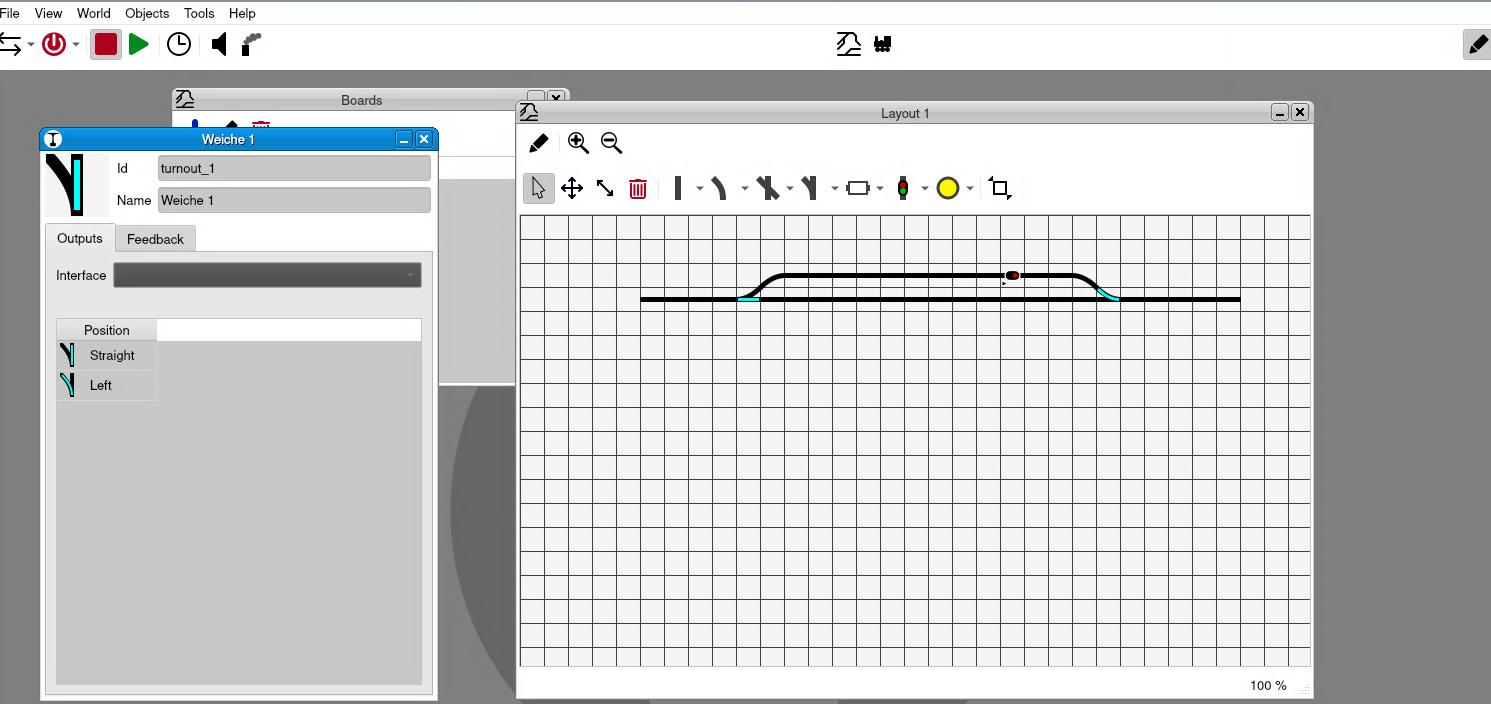
Seems, that’s the interface is not saved. I entered all data, Interface, events than I close the window and reopen it again and all entered data is lost.
just build the x86_64 version from master. The problem only occurs on the Raspberry Pi 4. The x86_64 system is running Bookworm, while the Pi is running Trixie.
I see, if I close the property windows for the point these message:
Locale: Missing translation for “Exception: invalid value error”
This error occurs when a input field contains an invalid value, due to everything being lost, I’d expect it is the interface value which is strange. Need to dive into it, I have a spare RPi I can use for that.
I’ve just discovered that it affects every object on the board, i.e., signals, turnouts, blocks, switches. If I only configure the interface, close the dialog window, and reopen it, the interface disappears again.
yes, it’s the same. Also if I set feedback too. It seems to make no difference which fields are filled and all settings are lost, if the dialog is closed. Time too
I need to debug this on an actual Pi, unfortunately I’m not at home this week, so that will be next week. (I do have my laptop with me and a CANCMD/CANCAB/CANUSB )
 , this feature was pitched in the MERG CBUS/VLCB hardware support topic.



 )
)