MERG CBUS/VLCB hardware support

Maybe my flaw to not introduce myself..
My name is Menno dutch expat, have been in IT / operations world for the better part of 30 years. I have done some coding ( perl/python/c/c++ ) but i would call my coding standards below par to bump in in a massive project like this :rofl:

Allthough cant help myself and to have a peek over at the italian signal stuf… :slight_smile:

Happy to help and thanks for taking this project on

– Menno

@reinder i had an unintended restart before i could save.
Yep world lost.
Maybe allow for frequent automatic saves?
and perhaps an option to save/rollback to previous version might be reaaly nice
Especially if you are trying to do tricky things…
For example:
I definitely had to revert a couple of times when i was working on signalling in jmri; saved me a bunch of start from scratch-es

–Menno

Moin Reinder & Menno,

I thought about that yesterday evening. Reinder, as you write there are pro and cons, I like it too without the extra save buttons. Simple, not much “clicking” :wink:

Frequently automatic backup saves could be a fine thing! Always the last 10 (or configurable) are could be saved every minute or so (or configurable) with timestamp as filename in a backup folder. I know different software, which does it (i.e. KiCad) What do you mean?

Yes, of course, it’s to late again :yawning_face:

Greetings, Tom

@reinder / @DL7BJ

Canusb definitely does not like to come back online for me after mucking with world and connections → E2002 Serial read failed ( bad address )

Is there a remote chance the serial connection is not torn down completely hence leading to strange behaviours?

After stop/start of the Traintastic server → all connections are working.
Perhaps a stale serial connection left behind??
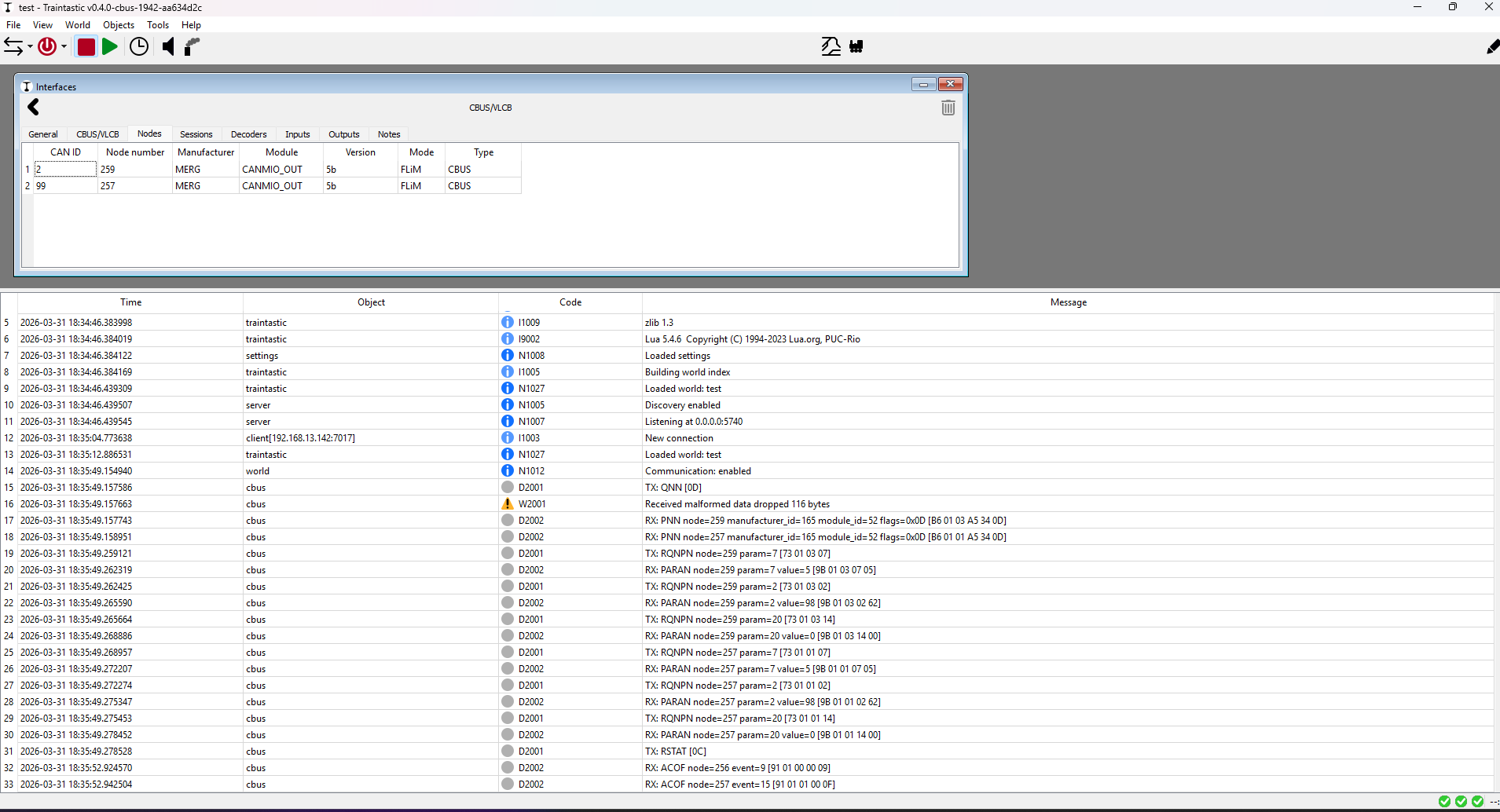
Scan looks better, but my most-populated node ( canmio-server node # 256 is still absent. Better!

Switching between Ethernet and USB mode? I think something in the backgound must get stuck because the CBUS interface will not come back online.

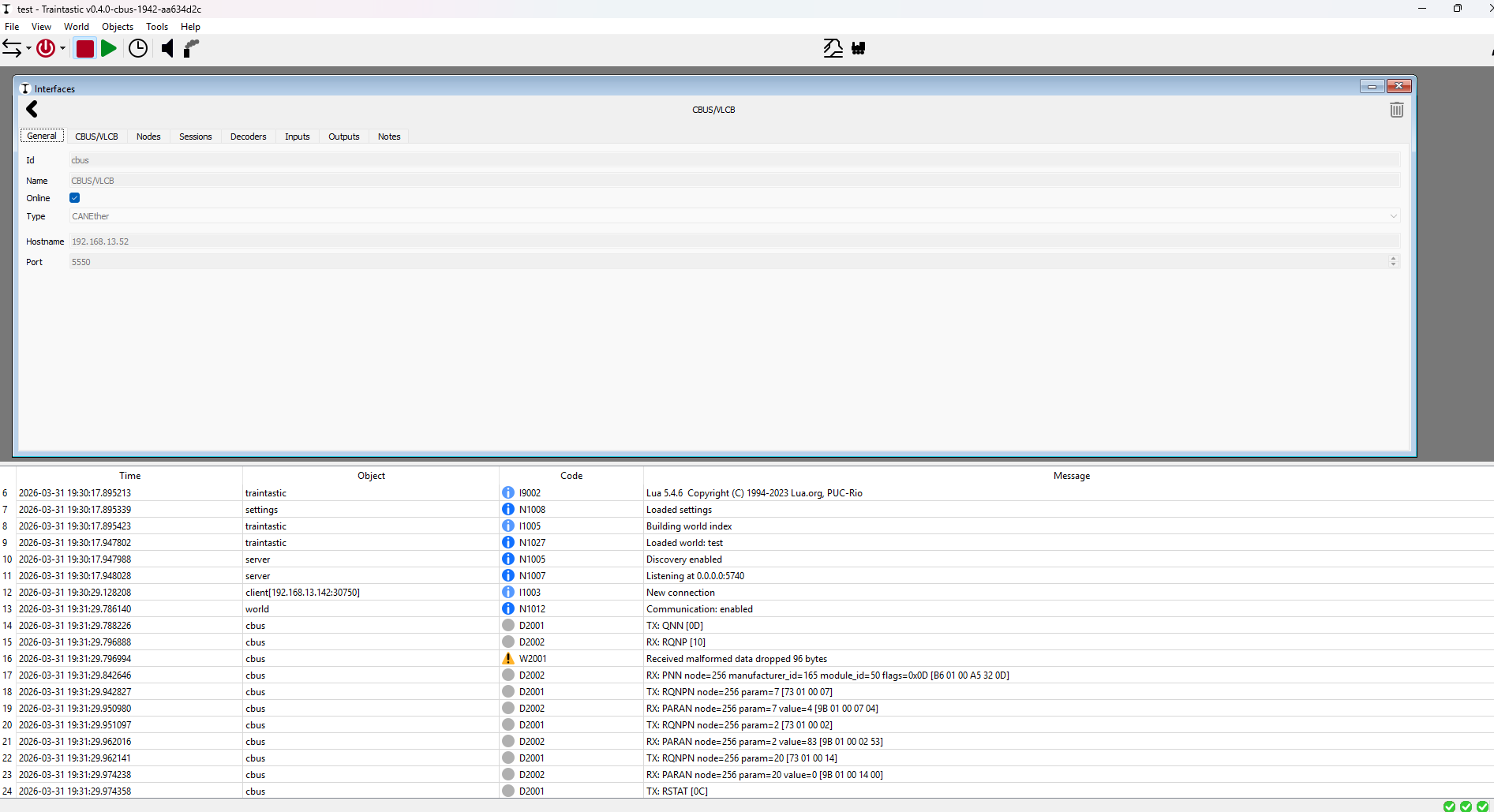
Via USB:

Via etnernet ( JMRI CBUS hub: )
After removal of usb serial +addition of network variant + stop/start of server:

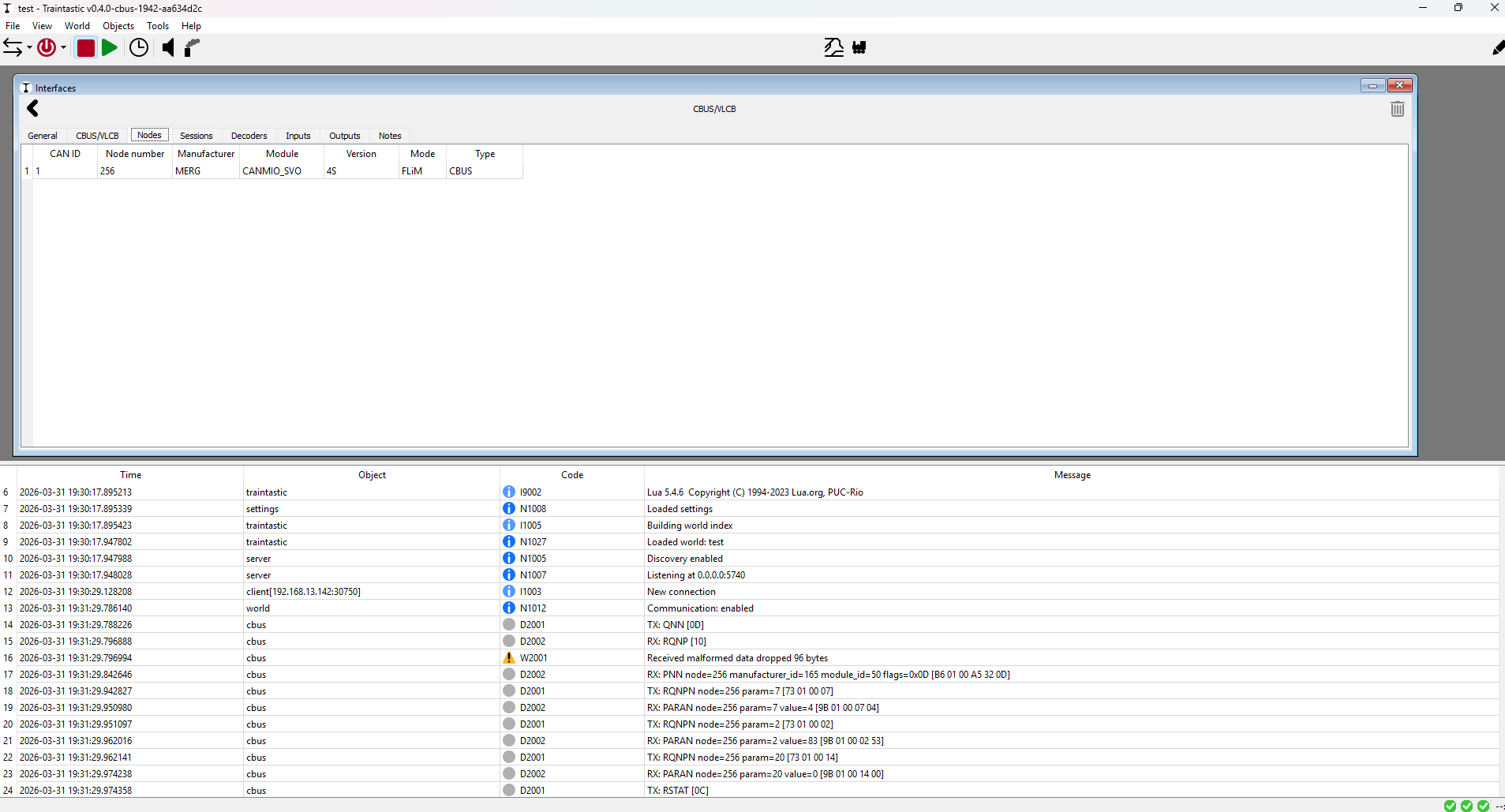
Just in case i have done some cleanup and made sure there is only one world in the world path, and connection is via Network; as well as restart of server side. First minor succes: Cbus via ethernet is saying hello:

but only from 1 node:

So a bit of a TLDr; than:

Pleased to see CBUS up via network :tada:

Switching from Serial to Network and Vice Versa seems to have some caching issues where it will fall back to Serial unless you stop/start the server

Observed issues with taking the world offline/online: Sometimes CBUS/USB will get in a bind → stop/start server

On detection:
Will do more investigtions, but it looks that the block occupancy on startup is doing something strange.
Fresh start ( merg cbus string powered down, restart traintastic )
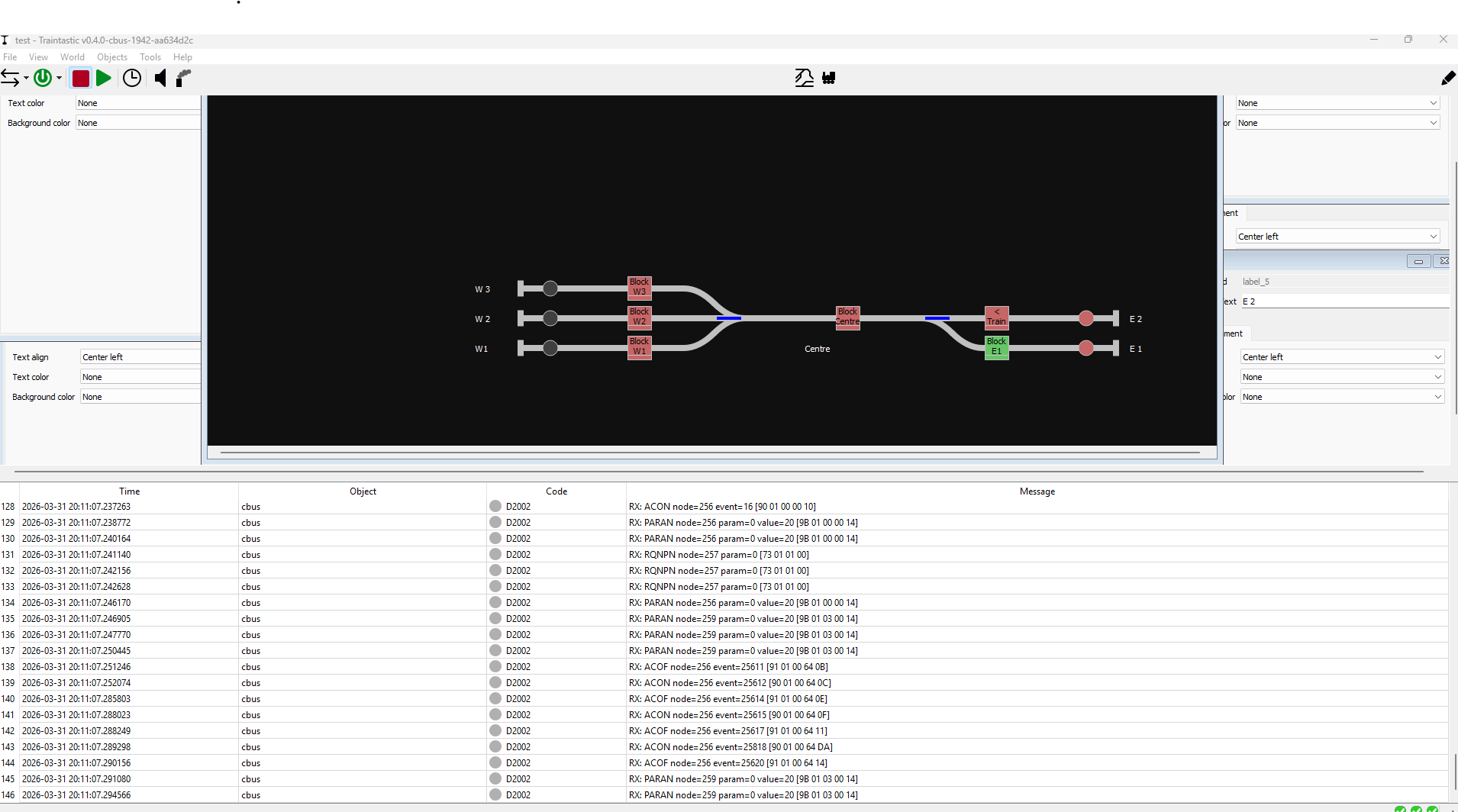
Traintastic thinks this is the current state:

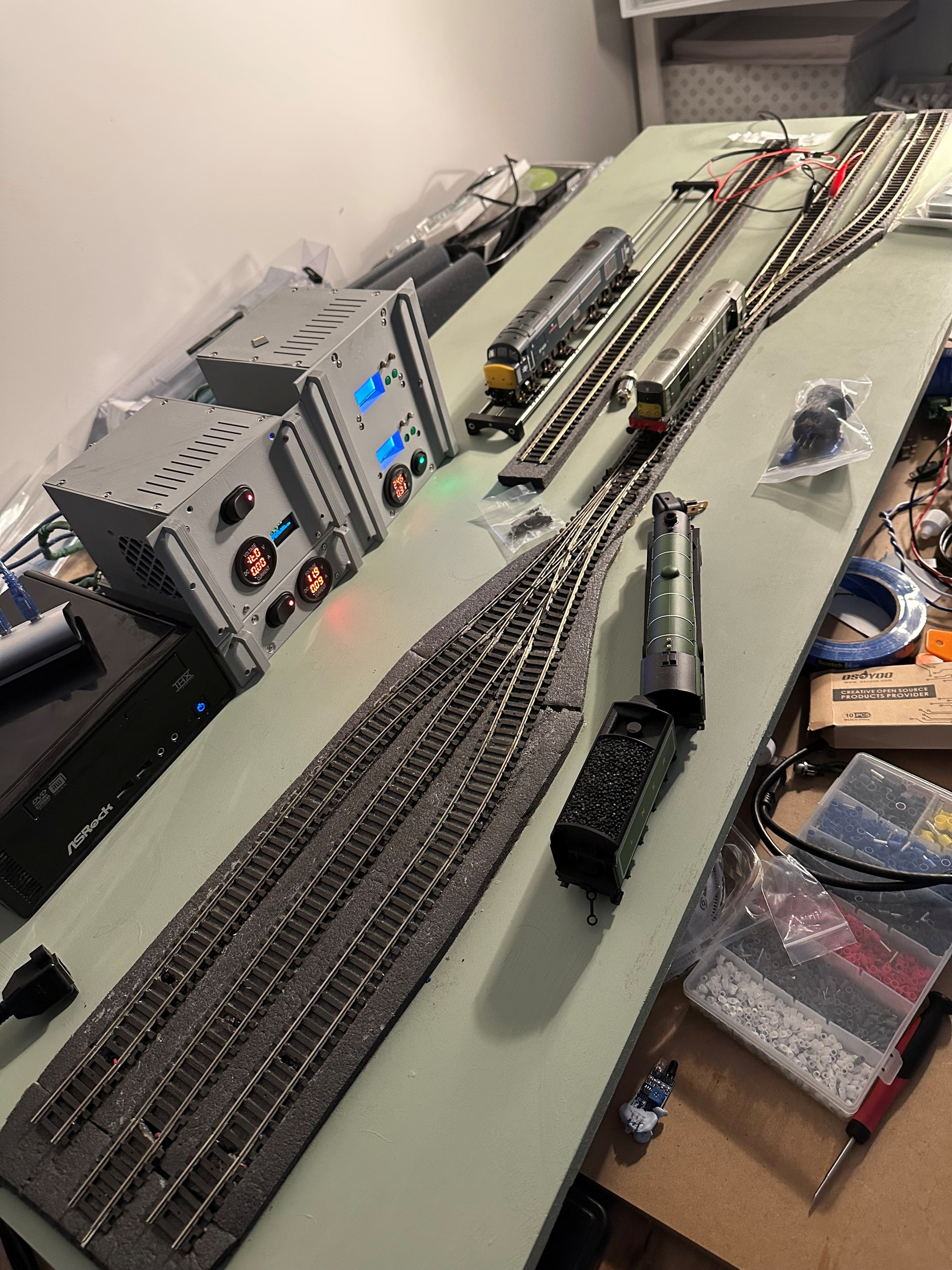
While reality says:

Or in words: the only 2 block occupied are:

  • Centre
  • East 2 [ due to my programming track / rolling road clipped on via East 2 ]

Two actions for me:

  1. Make sure JMRI is not playing games with me
  2. I have ordered a canether but it is going to take a while to land on shore here as well as me needing to find time to solder it / test it
    ( previous attempt 3.5v power bus drags down to 2 volt, power reg gets very hot :headstone: )

So for now this might be on me will check further.

I did notice one other behaviour: On startup my servos move to a know position.
On power-up [ start of day event @DL7BJ ] 3 way West switch goes to Left/West1 from memory ( 2 servos moving !). But ofcourse traintastic thinks it is still going straight ahead [ or whatever state was last seen ].

Maybe for a future options: Allow sensor readings for actual turnout state?
( i would still be slightly lying: my turnout goes from thrown/mid/closed based on perceived state commanded by the CBUS can-servo → i dont have a microswitch on the servo )
But it would catch a mis-set turnout …

Moin,

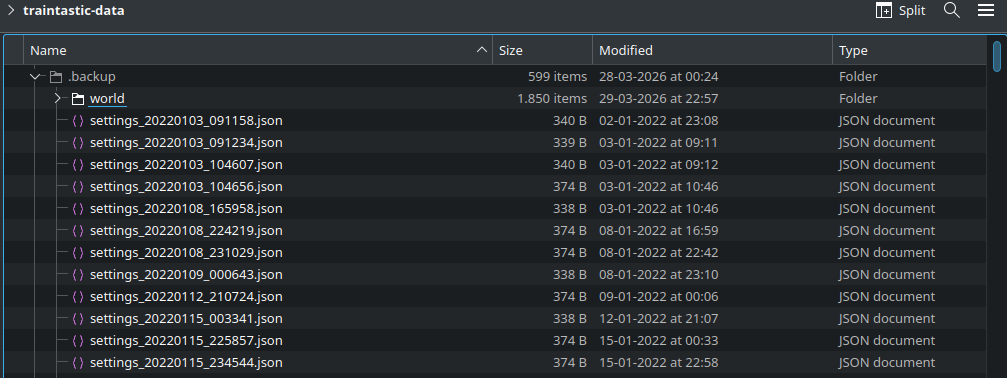
Traintastic already creates a backup on each save (it moves the old save to a backup folder and then saves the world to a new file), what is missing is a proper UI to actually load a backup… If you go to traintastic’s data folder you’ll see a .backup folder that contains world and setting backups:

Now back to CBUS/VLCB after the small side step.

Canusb definitely does not like to come back online for me after mucking with world and connections → E2002 Serial read failed ( bad address )

Is there a remote chance the serial connection is not torn down completely hence leading to strange behaviours?

Usually if a port is still open, the open command will fail not the write. Can you enable the server file log option, and then do it again and post the log here, based on a single error message it is hard for me to analyze the issue, I need more insight on the performed actions.

Switching between Ethernet and USB mode? I think something in the backgound must get stuck because the CBUS interface will not come back online.

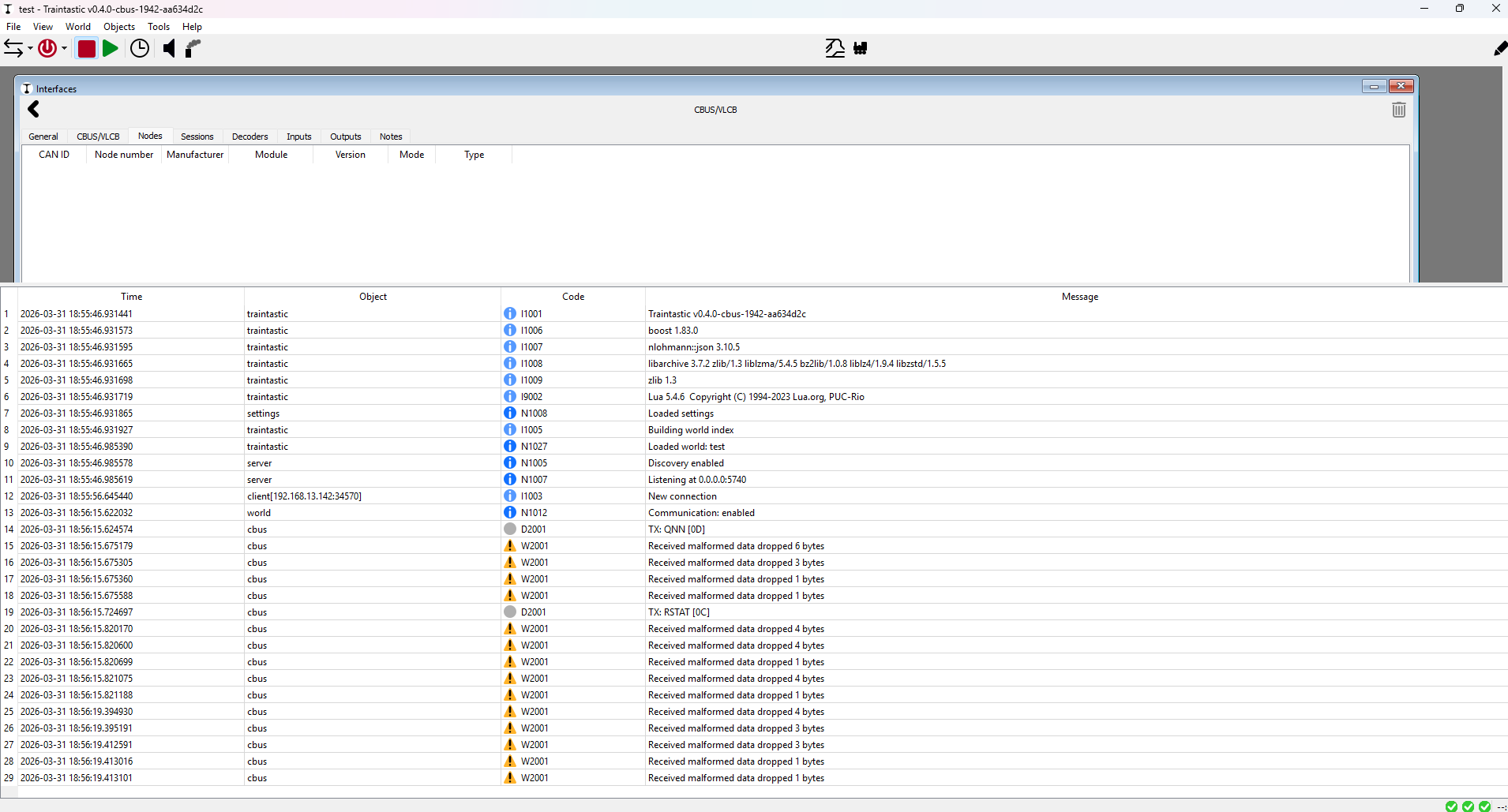
I think there is still a flaw in the CANEther logic, it uses the same text based protocol as for CANUSB, I think JMRI does that too. On your second try it still dropped 96 bytes it could process properly. Are you familiar with WireShark? It would be very helpful to capture the network traffic and share the pcap file, then we hopefully can figure out where it goes sideways.

Switching from Serial to Network and Vice Versa seems to have some caching issues where it will fall back to Serial unless you stop/start the server

If you do:

  • go offline
  • switch type: CANUSB ↔ CANEther
  • go online

that should not be an issue, if it is then there is something not handled correctly in Traintastic.

On detection:
Will do more investigtions, but it looks that the block occupancy on startup is doing something strange.
Fresh start ( merg cbus string powered down, restart traintastic )
Traintastic thinks this is the current state:

Based on the log I see all kind of events being received, I see multiple ON and OFF event. How are the events mapped to the blocks?

Does this also happen if you connect directly with CANUSB and no JMRI active?

I did notice one other behaviour: On startup my servos move to a know position.
On power-up [ start of day event @DL7BJ ] 3 way West switch goes to Left/West1 from memory ( 2 servos moving !). But ofcourse traintastic thinks it is still going straight ahead [ or whatever state was last seen ].

The start of the day event, is that a “fixed” event number send by JMRI (or something else) to trigger stuff? If that triggers stuff e.g. in a CANMIO module, but it isn’t reported, then Traintastic has no way of knowing what append. My yesterday evening I added logic to request all events states of events used by Traintastic at startup, I wonder if that helps in this case. It is available in build #1943.

Maybe for a future options: Allow sensor readings for actual turnout state?
( i would still be slightly lying: my turnout goes from thrown/mid/closed based on perceived state commanded by the CBUS can-servo → i dont have a microswitch on the servo )
But it would catch a mis-set turnout …

Traintastic currently relies on feedback of the “output” command, but for CBUS that doesn’t work in all cases, so yes that is something that should be added. You you have that configure in your modules?

Something like?:

  • Traintastic/JMRI sends event for turnout
  • Servo starts moving
  • Once servo is in position the module sends a different event to notify the turnout is in position.

Greetings,
Reinder

Moin Reinder,

src/hardware/protocol/can/iohandler/socketcaniohandler.hpp is missing #include <span>

Now I go testing :wink:

Greetings, Tom

1 Like

Moin Tom,

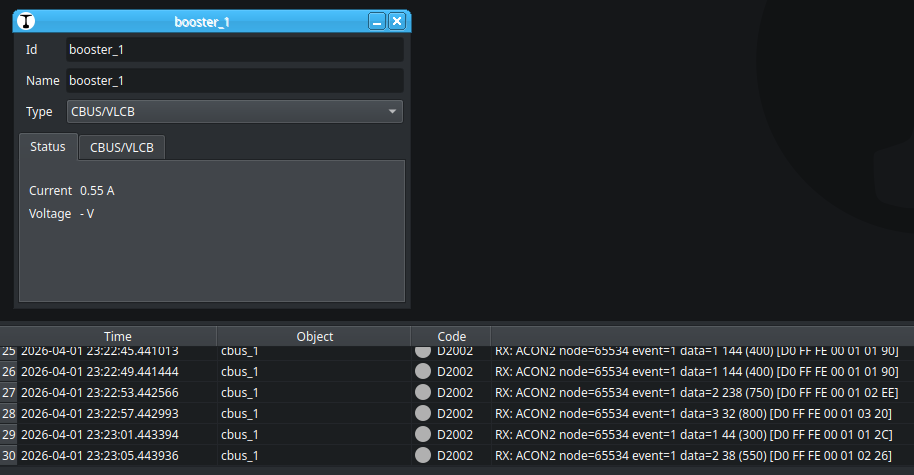
The data 1 244 are the average of the voltage read by A/D conversion of the controller multiplied by 50 as 16 Bit value, found it in the CANCMDB code. For the main track it use a 0.1R current sense resistor at Sense A (pin 1) of the L298N; I never used this driver and read just the datasheet. The max current for a half L298 is 2A. So the max voltage for A/D conversion can be 200mV. The two bytes are 1 x 256 + 244 = 500 → 500 / 50 = 10. The converted A/D value must be ~10 for 550mA. The A/D converter is a 10Bit, the reference voltage 5V → 10 / 1023 * 5 = 49mV. I = U/R → 49mV/0.1R = 0.49A

Thorough investigation, I crossed checked it with the JMRI source, they read it as mA as well, so now we know for sure :slight_smile: The ACON2 NN:65534 EN:2 is the voltage in 100mV steps according to the JMRI source, it it possible to enable that using MMC?

I’ll look into building smart booster support for CBUS/VLCB, Traintastic currenlt only supports LocoNet smart boosters, so its a nice HAL test :slight_smile:

Greetings,
Reinder

Moin,

I made some short tests. But that’s not my way of testing things. We have Traintastic, JMRI with the hub and CANUSB — that’s too many potential sources of error for me. First, Traintastic should be tested with the CANETHER, not with software that might contain bugs. That’s too much uncertainty for me.

I got this with Traintastic:

2026-03-31 23:31:48.703084 world N1012: Communication: enabled
2026-03-31 23:31:48.703478 cbus_2 E1007: Socket read failed (Bad address)
2026-03-31 23:31:50.795224 world N1016: Running
2026-03-31 23:31:56.815078 cbus_2 E1007: Socket read failed (Bad address)
2026-03-31 23:32:01.404809 cbus_2 E1007: Socket read failed (Bad address)
2026-03-31 23:32:02.720720 cbus_2 E1007: Socket read failed (Bad address)
2026-03-31 23:32:03.711346 cbus_2 E1007: Socket read failed (Bad address)

And this with JMRI if I start Traintastic:

MRI  < <  CBUS |  QNN  Query node numbers 
JMRI  > >  CBUS |  QNN  Query node numbers 
JMRI  < <  CBUS |  PNN NN:65535  Manuf ID: 165 Mod ID: 9 Flags: 10 Query Node Response 
JMRI  < <  CBUS |  PNN NN:1  Manuf ID: 165 Mod ID: 32 Flags: 95 Query Node Response 
JMRI  < <  CBUS |  PNN NN:65534  Manuf ID: 165 Mod ID: 83 Flags: 14 Query Node Response 

That shows the answers of the three nodes I have. But in Traintastic I see nothing of this answers, only this:

026-03-31 23:48:01.240731 client[127.0.0.1:33602] I1003: New connection
2026-03-31 23:48:05.274293 world N1012: Communication: enabled
2026-03-31 23:48:05.274839 cbus_2 E1007: Socket read failed (Bad address)

And it cannot be ruled out that this is a problem with the JMRI Hub. With telnet 5550 I could connect to the JMRI Hub, but that says nothing. I don’t like primary tests with intermediate solutions like JMRI here; you never know where to look. I think we need to focus on the essentials here: the CANUSB and CANETHER hardware interfaces. Since I’m not planning on a network connection, I don’t have CANETHER.

Greetings, Tom

Moin Tom,

This helps understanding the issue better, if I understand correctly:
MRI < < CBUS | QNN Query node numbers JMRI Hub thing receives the message from Traintastic
JMRI > > CBUS | QNN Query node numbers JMRI forwards it to the CBUS hardware

JMRI  < <  CBUS |  PNN NN:65535  Manuf ID: 165 Mod ID: 9 Flags: 10 Query Node Response 
JMRI  < <  CBUS |  PNN NN:1  Manuf ID: 165 Mod ID: 32 Flags: 95 Query Node Response 
JMRI  < <  CBUS |  PNN NN:65534  Manuf ID: 165 Mod ID: 83 Flags: 14 Query Node Response

JMRI receives responses from CBUS, now I would expect something like:
MRI > > CBUS | PNN NN:65535 Manuf ID: 165 Mod ID: 9...

But I see socket errors as well in Traintastic, so something is wrong there…

Greetings,
Reinder

@DL7BJ I agree, canether it is. New board on order waiting to land on shore and build/test-time.

Below my configuration i have on CBUS:

cbus-events.csv (6.2 KB)

( both throwing the servos as well as the misc. sensors )

Moin Reinder,

The CANCMDB has no possibilty to measure the voltage. The L298N has only the inputs to control the H-bridges and the sense pins to connect the shunt. For voltage infos, the +15V track voltage must be measuered with A/D of PIC - no hardware and free port for this :wink:

I know, that some command stations could do this, but I don’t see the point. We have always power supplies with regulated output voltage. Only on short circuit or overload the voltage could disappear. So a simple ON/OFF would be sufficient. Another thing to note is that you can only really measure the input voltage of the H-bridge, because a TRMS measurement is required for the DCC signal to obtain correct values, it’s not a simple DC voltage :wink:

Greetings, Tom

Moin Tom & Menno,

Found something in the code, a variable wasn’t properly initialized, should also be an issue for CANUSB but somehow we got lucky, the fix will be available on build #1945. (Builds are cruching…)

The CANCMDB has no possibilty to measure the voltage. The L298N has only the inputs to control the H-bridges and the sense pins to connect the shunt. For voltage infos, the +15V track voltage must be measuered with A/D of PIC - no hardware and free port for this :wink:

Ok, I’ll just implement it, it almost free to add when the rest is there.
Measuring the input voltage is indeed a gimmic, not very useful.

Time to sleep now…

Greetings,
Reinder

Moin Reinder,

Yes, but on which side?

On the other hand, telnet 5550 to JMRI works immediately, and I can then see the current data every 5 seconds, as I configured in CANCMDB. I’m always a bit unsure about these kinds of tests.

I think you use for the network connection also the Boost Libs? You could have a look at the parameters, I tried at first “localhost”, then my ip and at last the 127.0.0.1. JMRI opens a port on all addresses, also ::1 IPv6. But I must always click multiple times on the checkmark for “Online” in Traintastic.

At weekend I could do it with more time, this week is a little bit heavy at work.

Greetings, Tom

1 Like

@DL7BJ / @reinder
You could also argue that Traintastic should only bind to selected interfaces instead of all.
Example: My host computer has at minimum 2 interfaces:
1 ethernet
1 wifi / hostapd for wifi throttles

Some hosts / interfaces wdo not have ipv6 while others do.
Wonder if that “helps” to confuse the go-online thing too?

And my opinion is: only the ethernet should be bound
Or rather: have the option to bind to 1 specific interface.
my ethernet will be able to connect to jmri/dcc-ex while wifi might not
( if i did my job right :rofl: )

No not a priority, yes nice to have. But it would tighten up open ports etc.
I wouldnt mind if this is an expert move ( edit the file ) since others may not care.

FWIW @reinder You have a PM containing:

  • My CBUS config as a csv [ jmri export ]
  • my world and backups + logs from traintastic server
  • and discussed elsewhere roster

( apologies havent done any more testing today, not feeling well )

Moin Ton & Menno,

That is a strong indication something is wrong on the Traintastic side. I wonder what the telnet output is, Traintastic expects :SXXXXNXXXXXXXXXXXXXXXX; for each CAN message. the first XXXX is the 11 bit CAN ID in hex (left aligned), the second XXXXXXXXXXXXXXXX is 1 to 8 data bytes in hex as well. Are there newlines between the messages?

I think you use for the network connection also the Boost Libs? You could have a look at the parameters, I tried at first “localhost”, then my ip and at last the 127.0.0.1. JMRI opens a port on all addresses, also ::1 IPv6. But I must always click multiple times on the checkmark for “Online” in Traintastic.

Yes it both serial and network/socket are boost::asio based.

Traintastic expects an IP, the field is named hostname, as that is the plan…but that is still on the todo list. It accepts IPv4 and IPv6 addresses.

At weekend I could do it with more time, this week is a little bit heavy at work.

No problem, take your time, its just an hobby :slight_smile:

You could also argue that Traintastic should only bind to selected interfaces instead of all.
Example: My host computer has at minimum 2 interfaces:
1 ethernet
1 wifi / hostapd for wifi throttles

Some hosts / interfaces wdo not have ipv6 while others do.
Wonder if that “helps” to confuse the go-online thing too?

And my opinion is: only the ethernet should be bound
Or rather: have the option to bind to 1 specific interface.
my ethernet will be able to connect to jmri/dcc-ex while wifi might not
( if i did my job right :rofl: )

I thought about this when I wrote the first lines of Traintastic. I decided not to support it, many users of Traintastic’s (potential) target audience are not techies that understand networking, so big change they configure it wrongly and blame Traintastic. Those who understand most likely also know how to configure a firewall and block it on those interfaces :slight_smile:

( apologies havent done any more testing today, not feeling well )

No problem at all :slight_smile: its a hobby, not work. (although working fulltime on Traintastic and getting a salary would be awesome…but unrealistic)

Greetings,
Reinder

Moin Tom & Menno,

Implemented reading the CANCMD current reading :slight_smile:

Tested it using virtual SocketCAN interface (on Linux), a Python script generated the ACON2 events: utils/cbus/cbus_cancmdb_current_sim.py

Greetings,
Reinder

@reinder Benefit of having automatons? TEST FRAMEWORK! :rofl:
good move!
Automated tests go a long way but it will take some real users to find the weak spots outside the (automated) happy path…

If you ever need a good reason to cater for sensor support in points or general protection…

Layout fire due to short-circuits

Moin Reinder,

This I see with telnet localhost 5550:

tom@amarok:~$ telnet localhost 5550
Trying ::1...
Connected to localhost.
Escape character is '^]'.
:SBFE0ND0FFFE00010000;:SBFE0ND0FFFE00010000;:SBFE0ND0FFFE00010000;:SBFE0ND0FFFE00010000;:SBFE0ND0FFFE00010000;:SBFE0ND0FFFE00010000;:SBFE0ND0FFFE00010000;:SBFE0ND0FFFE00010000;:SBFE0ND0FFFE00010000;:SBFE0ND0FFFE00010000;:SBFE0ND0FFFE00010000;:SBFE0ND0FFFE00010000;:SBFE0ND0FFFE00010000;:SBFE0ND0FFFE00010000;:SBFE0ND0FFFE00010000;:SBFE0ND0FFFE00010000;:SBFE0ND0FFFE00010000;:SBFE0ND0FFFE00010000;:SBFE0ND0FFFE00010000;:SBFE0ND0FFFE00010000;:SBFE0ND0FFFE00010000;:SBFE0ND0FFFE00010000;:SBFE0ND0FFFE00010000;:SBFE0ND0FFFE00010000;:SBFE0ND0FFFE00010000;:SBFE0ND0FFFE00010000;:SBFE0ND0FFFE00010000;:SBFE0ND0FFFE00010000;:SBFE0ND0FFFE00010000;:SBFE0ND0FFFE00010000;:SBFE0ND0FFFE00010000;:SBFE0ND0FFFE00010000;:SBFE0ND0FFFE00010000;:SBFE0ND0FFFE00010000;:SBFE0ND0FFFE00010000;:SBFE0ND0FFFE00010000;:SBFE0ND0FFFE00010000;:SBFE0ND0FFFE00010000;:SBFE0ND0FFFE00010000;:SBFE0ND0FFFE00010000;:SBFE0ND0FFFE00010000;:SBFE0ND0FFFE00010000;:SBFE0ND0FFFE00010000;:SBFE0ND0FFFE00010000;:SBFE0ND0FFFE00010000;:SBFE0ND0FFFE00010000;:SBFE0ND0FFFE00010000;:SBFE0ND0FFFE00010000;:SBFE0ND0FFFE00010000;:SBFE0ND0FFFE00010000;:SBFE0ND0FFFE00010000;:SBFE0ND0FFFE00010000;:SBFE0ND0FFFE00010000;:SBFE0ND0FFFE00010000;:SBFE0ND0FFFE00010000;:SBFE0R;:SBFE0N;:SB020N400003;:SBFE0NE101000380000000;:SB020N440100;:SB020N470180;:SBFE0ND0FFFE00010000;:SB020N2301;:SB020N470182;:SBFE0ND0FFFE00010032;:SB020N470183;:SB020N470184;:SB020N470185;:SB020N470186;:SB020N470187;:SB020N470188;:SB020N470189;:SBFE0ND0FFFE00010064;:SB020N2301;:SB020N47018A;:SBFE0ND0FFFE00010064;:SB020N47018B;:SB020N47018C;:SB020N47018D;:SB020N470190;:SB020N470192;:SB020N470193;:SBFE0ND0FFFE00010064;:SB020N2301;:SBFE0ND0FFFE00010032;:SB020N470180;:SB020N2301;:SBFE0ND0FFFE00010096;:SBFE0ND0FFFE00010000;:SB020N2301;:SBFE0ND0FFFE00010000;:SBFE0ND0FFFE00010000;:SB020N2301;:SBFE0ND0FFFE00010000;:SB020N2301;:SBFE0ND0FFFE00010000;

After the ‘N’ is a D0 (ACON2) before the node address and after the node address the 8 data bytes.

Greetings, Tom